
MLOps Project: Part 3: Machine Learning Model Deployment
 Isaac Kargar6 min read
The experiment-tracking post trained several sentiment models and registered their artifacts. This article follows the neural model path because its MLflow run stores both the Keras model and its tokenizer. The Bag of Words and TF-IDF runs are self-contained scikit-learn pipelines and require a different service contract. The next decision is how predictions should be delivered, so this article keeps serving choices separate from one FastAPI implementation that loads the registered neural model and serves local and cloud requests.
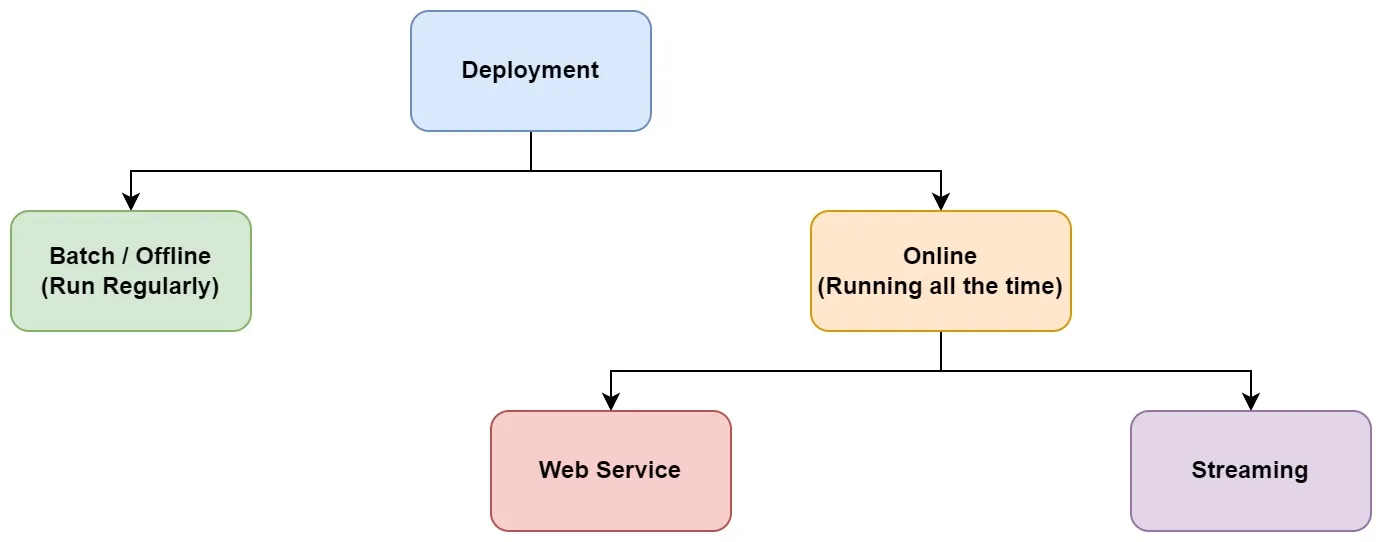
Choose a serving pattern
The first question is the required response time.
- Batch or offline inference runs on a schedule or after a file arrives. It is suitable when predictions can wait minutes or hours and usually has a lower always-on cost.
- Online inference keeps a service available for individual requests. The client sends a request and receives a result.
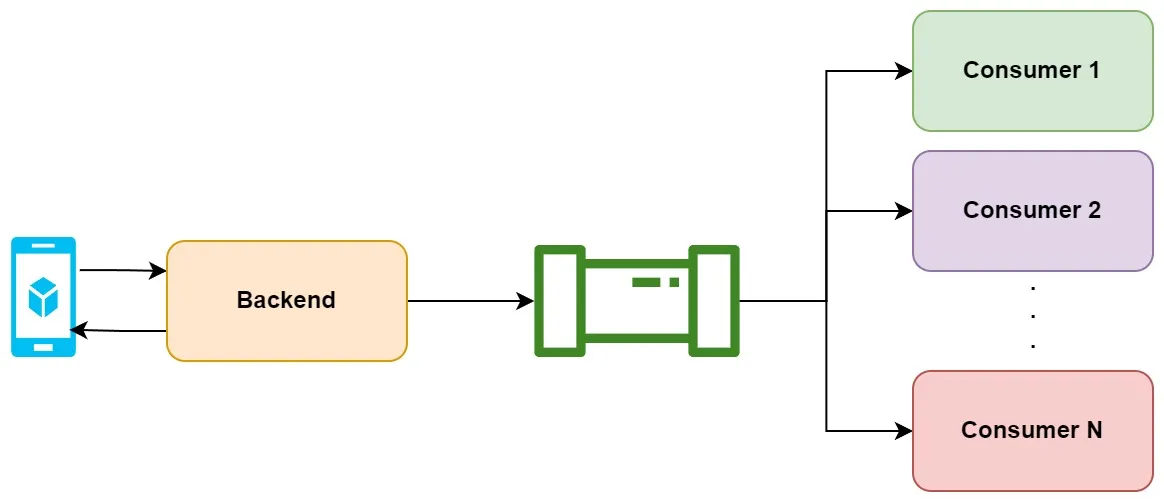
- Streaming inference consumes events from a broker. A producer and many consumers can process each event without maintaining one request connection.
Batch
A batch job reads a bounded set of records, calls the model in batches, and writes predictions to a table or object. The model and tokenizer are loaded once when the job starts. A result table can then feed a report, a queue, or another pipeline.
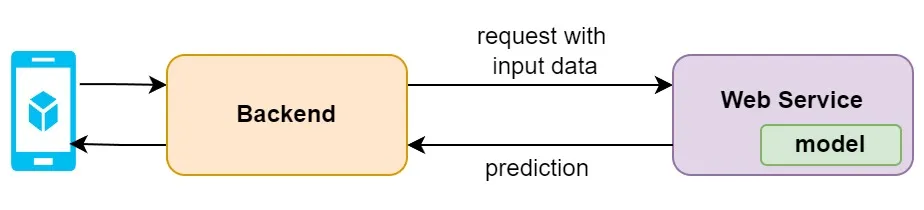
Online
An online web service exposes a prediction endpoint over HTTP. A serverless platform such as Cloud Run can scale a service according to requests, subject to its configured minimum instances and startup time.
Streaming
A streaming design has producers publish events to a broker and consumers process them independently. It suits many-to-many event delivery and continuous workloads. The consumer still needs a versioned model, an error path, and a way to record prediction results.
The MLOps Zoomcamp deployment lecture compares these patterns.
Serving tools
A managed platform can supply deployment, autoscaling, identity, and monitoring. Kubernetes serving projects provide a different boundary: they define a model-serving resource and let the cluster handle scheduling and rollout. Frameworks such as BentoML package a model and its dependencies into a service.
- KServe provides Kubernetes resources and runtime protocols for model serving.
- Seldon Core provides Kubernetes model deployment and inference components.
- BentoML packages models into deployable services.
The choice depends on the existing platform, the model runtime, the security boundary, and the release process. The examples below use a plain FastAPI service so its request contract is visible.
Load the registered model once
The service below reads the MLflow tracking URI, model name, and alias from its environment. The alias must point to the registered neural model described in the tracking post. It resolves the alias at startup, downloads the tokenizer from the same model version, and keeps both objects in memory. A request never downloads an artifact or constructs a model.
The preprocessing function uses the same alphabetic range, stemming, and stopword steps as training.
from __future__ import annotations

import os
import pickle
import re
from contextlib import asynccontextmanager
from pathlib import Path
from typing import Any

import mlflow
import numpy as np
from fastapi import FastAPI, HTTPException
from mlflow.tracking import MlflowClient
from nltk.corpus import stopwords
from nltk.stem import PorterStemmer
from tensorflow.keras.preprocessing.sequence import pad_sequences


STOP_WORDS = set(stopwords.words("english"))
STEMMER = PorterStemmer()
TRACKING_URI = os.environ["MLFLOW_TRACKING_URI"]
MODEL_NAME = os.environ.get(
    "MODEL_NAME",
    "customer-sentiment-analysis",
)
MODEL_ALIAS = os.environ.get("MODEL_ALIAS", "champion")
ARTIFACT_DIR = Path(
    os.environ.get("ARTIFACT_DIR", "/tmp/model-artifacts")
)


def preprocess(review: str) -> str:
    words = re.sub(r"[^a-zA-Z]", " ", review).lower().split()
    return " ".join(
        STEMMER.stem(word)
        for word in words
        if word not in STOP_WORDS
    )


def load_model_and_tokenizer():
    mlflow.set_tracking_uri(TRACKING_URI)
    client = MlflowClient(tracking_uri=TRACKING_URI)
    version = client.get_model_version_by_alias(
        MODEL_NAME,
        MODEL_ALIAS,
    )
    model = mlflow.pyfunc.load_model(
        f"models:/{MODEL_NAME}@{MODEL_ALIAS}"
    )

    ARTIFACT_DIR.mkdir(parents=True, exist_ok=True)
    tokenizer_path = client.download_artifacts(
        run_id=version.run_id,
        path="preprocessing/tokenizer.pickle",
        dst_path=str(ARTIFACT_DIR),
    )
    with open(tokenizer_path, "rb") as handle:
        tokenizer = pickle.load(handle)

    return model, tokenizer, version.version


def predict_review(model: Any, tokenizer: Any, review: str) -> float:
    cleaned = preprocess(review)
    if not cleaned:
        raise HTTPException(
            status_code=400,
            detail="review must contain at least one alphabetic word",
        )

    sequences = tokenizer.texts_to_sequences([cleaned])
    padded = pad_sequences(sequences, padding="post")
    values = np.asarray(model.predict(padded)).reshape(-1)
    return float(values[0])


@asynccontextmanager
async def lifespan(app: FastAPI):
    app.state.model, app.state.tokenizer, app.state.model_version = (
        load_model_and_tokenizer()
    )
    yield


app = FastAPI(
    title="Fashion Sentiment Analysis API",
    description="Predicts a recommendation score for a clothing review.",
    version="1.0.0",
    lifespan=lifespan,
)


@app.get("/")
def root():
    return {"message": "Customer review sentiment analysis"}


@app.get("/health")
def health():
    return {"status": "ok", "model_version": app.state.model_version}


@app.get("/predict")
def predict(review: str):
    score = predict_review(
        app.state.model,
        app.state.tokenizer,
        review,
    )
    return {"prediction": score}


@app.post("/predict")
def predict_batch(payload: dict[str, Any]):
    instances = payload.get("instances")
    if not isinstance(instances, list) or not instances:
        raise HTTPException(
            status_code=400,
            detail="instances must contain at least one review",
        )

    predictions = []
    for item in instances:
        if not isinstance(item, dict) or not isinstance(item.get("review"), str):
            raise HTTPException(
                status_code=400,
                detail="each instance must contain a string review",
            )
        predictions.append(
            predict_review(
                app.state.model,
                app.state.tokenizer,
                item["review"],
            )
        )
    return {"predictions": predictions}
There are two prediction forms. The GET endpoint is convenient for a browser or a small UI. The POST endpoint accepts the JSON instances and predictions shape used by Vertex AI custom containers. Both paths preserve the batch dimension by passing a list of reviews to texts_to_sequences and by leaving pad_sequences output untransposed.
The lifespan hook loads the artifacts before the app accepts requests. If the alias, tracking endpoint, or tokenizer is unavailable, startup fails and the deployment remains unhealthy instead of returning a different error for every request.
Package the service
Install the exact dependencies used by the trained model and keep the dependency file with the model release. The TensorFlow and MLflow versions must match the environment used to create the artifact.
fastapi==0.115.6
mlflow==3.5.0
nltk==3.9.1
numpy==2.0.2
tensorflow==2.18.0
uvicorn[standard]==0.34.0
Download NLTK data while building the image, not during a user request:
FROM python:3.12-slim

WORKDIR /app
COPY requirements.txt .
RUN pip install --no-cache-dir -r requirements.txt \
    && python -m nltk.downloader \
       --quiet \
       --download-dir /usr/local/share/nltk_data \
       stopwords

ENV NLTK_DATA=/usr/local/share/nltk_data
COPY main.py .
EXPOSE 8080

CMD ["uvicorn", "main:app", "--host", "0.0.0.0", "--port", "8080"]
The service needs access to the MLflow tracking endpoint. It does not need a key file in the image. On Google Cloud, attach a runtime identity with the permissions required by the tracking server and provide any tracking-server token through Secret Manager or the platform’s secret integration.
Test the contract locally with a model registry that contains the champion alias:
export MLFLOW_TRACKING_URI="http://127.0.0.1:5000"
export MODEL_NAME="customer-sentiment-analysis"
export MODEL_ALIAS="champion"

docker build --tag sentiment-api:dev .
docker run --rm --publish 8080:8080 \
  --env MLFLOW_TRACKING_URI \
  --env MODEL_NAME \
  --env MODEL_ALIAS \
  sentiment-api:dev
The service exposes OpenAPI documentation at http://localhost:8080/docs. A healthy startup indicates that the alias and tokenizer were found. The API can then be called with encoded query parameters:
curl --fail-with-body --get \
  --data-urlencode "review=The fabric is soft and the fit is comfortable" \
  http://localhost:8080/predict

curl --fail-with-body \
  -H "Content-Type: application/json" \
  -d '{"instances":[{"review":"The fabric is soft and the fit is comfortable"},{"review":"The size was disappointing"}]}' \
  http://localhost:8080/predict
Deploy on Cloud Run
Build the inference image and deploy that image as the service. The image contains the health and prediction routes; a separate UI image must not be used as the Vertex or Cloud Run inference container.
export PROJECT_ID="YOUR_GCP_PROJECT"
export REGION="europe-west1"
export REPOSITORY="mlops"
export IMAGE_URI="$REGION-docker.pkg.dev/$PROJECT_ID/$REPOSITORY/sentiment-api:latest"
export RUNTIME_SERVICE_ACCOUNT="sentiment-runtime@$PROJECT_ID.iam.gserviceaccount.com"
export MLFLOW_TRACKING_URI="https://YOUR_TRACKING_ENDPOINT"
export MODEL_NAME="customer-sentiment-analysis"
export MODEL_ALIAS="champion"

gcloud builds submit --tag "$IMAGE_URI"

gcloud run deploy sentiment-api \
  --image="$IMAGE_URI" \
  --project="$PROJECT_ID" \
  --region="$REGION" \
  --service-account="$RUNTIME_SERVICE_ACCOUNT" \
  --no-allow-unauthenticated \
  --set-env-vars="MLFLOW_TRACKING_URI=$MLFLOW_TRACKING_URI,MODEL_NAME=$MODEL_NAME,MODEL_ALIAS=$MODEL_ALIAS"
Use Cloud Run’s secret integration for any MLflow authentication value. The caller needs permission to invoke the service when unauthenticated access is disabled. Configure a minimum instance count only when the latency and cost tradeoff justifies it.
A small Streamlit client
A client should pass the review as a query parameter rather than concatenating it into a URL. The requests library handles encoding when its params argument is used:
import os

import requests
import streamlit as st


st.set_page_config(
    page_title="Fashion Sentiment Analysis",
    page_icon="📈",
)
st.header("Fashion Sentiment Analysis")

review_text = st.text_input(
    "Product review",
    "The fit is comfortable",
)

if st.button("Analyze"):
    response = requests.get(
        os.environ["PREDICTION_ENDPOINT"],
        params={"review": review_text},
        timeout=30,
    )
    response.raise_for_status()
    st.write("Prediction:", response.json())
Package this UI separately from the inference service. Its endpoint is a deployment variable, and it should use the authentication expected by the Cloud Run service:
The UI requirements file contains the two packages imported by the example:
requests==2.34.2
streamlit==1.63.0
FROM python:3.12-slim
WORKDIR /app
COPY requirements-ui.txt .
RUN pip install --no-cache-dir -r requirements-ui.txt
COPY app.py .
EXPOSE 8080
CMD ["streamlit", "run", "app.py", "--server.port", "8080", "--server.address", "0.0.0.0"]Deploy on Vertex AI
Vertex AI custom containers expect a health route and a prediction route. The inference image above supplies both. The commands store the model and endpoint identifiers in shell variables populated by deployment responses:
export MODEL_ID="$(
  gcloud ai models upload \
    --project="$PROJECT_ID" \
    --region="$REGION" \
    --display-name=sentiment-api \
    --container-image-uri="$IMAGE_URI" \
    --container-health-route=/health \
    --container-predict-route=/predict \
    --container-ports=8080 \
    --format="value(name)"
)"

export ENDPOINT_ID="$(
  gcloud ai endpoints create \
    --project="$PROJECT_ID" \
    --region="$REGION" \
    --display-name=sentiment-api \
    --format="value(name)"
)"

gcloud ai endpoints deploy-model "$ENDPOINT_ID" \
  --project="$PROJECT_ID" \
  --region="$REGION" \
  --model="$MODEL_ID" \
  --display-name=sentiment-api \
  --traffic-split="0=100"
Use the accelerator and machine options documented for the selected Vertex AI region and runtime. Vertex AI and Cloud Run have different scaling, networking, authentication, and request contracts; choose one deployment boundary and test its health and prediction routes before routing traffic.
KServe
KServe adds a Kubernetes custom resource around an inference runtime. It can supply deployment and rollout primitives, but it still requires a cluster, model storage, identity, and an explicit request contract. The KServe documentation and ZenML’s current Kubernetes deployer guide describe the surrounding deployment options.
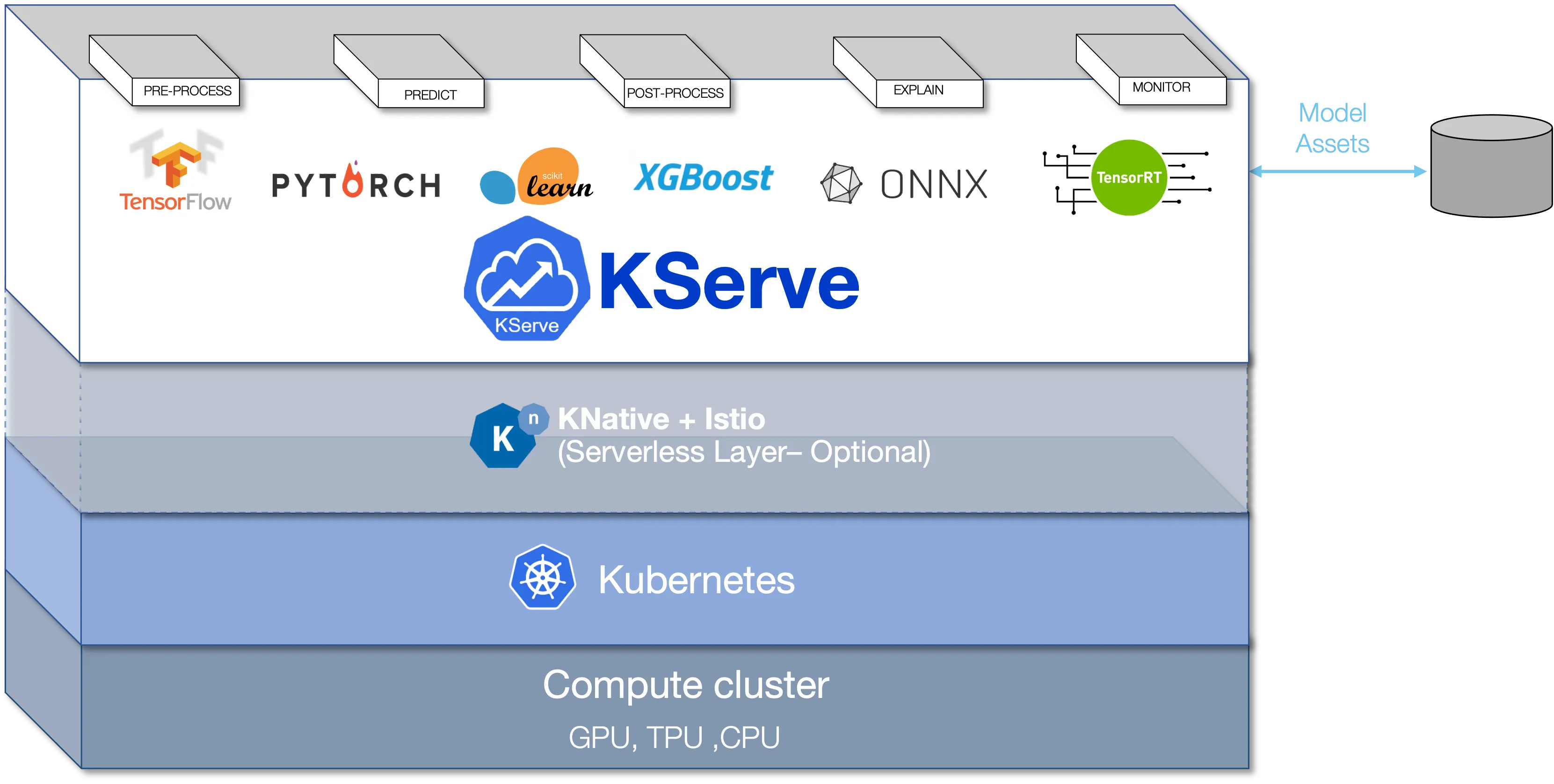
A deployment is complete only when the model artifact, preprocessing, health check, prediction schema, authentication, and rollback path have been tested together. The next post covers monitoring the service after it receives traffic.
Work with Nazmi
Build your AI system with Nazmi.
Tell us what you are building, what exists today, and where your team needs help.
Start a conversation or book a 20-minute call →