
MLOps Project: Workflow orchestration with Prefect
 Isaac Kargar5 min read
The experiment-tracking post trained a sentiment classifier and recorded its metrics with MLflow. This post turns that work into a small, reproducible workflow. The data split happens before the vectorizer is fitted, validation stays separate from the final test set, and the model artifact is identified by the run that produced it.
A workflow is useful when training has several dependent steps, needs retries, or should run on a schedule. It also gives each run a visible state and a record of its inputs and outputs. Orchestration does not make a model accurate by itself. It makes the surrounding work easier to repeat and inspect.
The workflow
A typical machine-learning workflow has data acquisition, preparation, training, evaluation, and deployment stages:
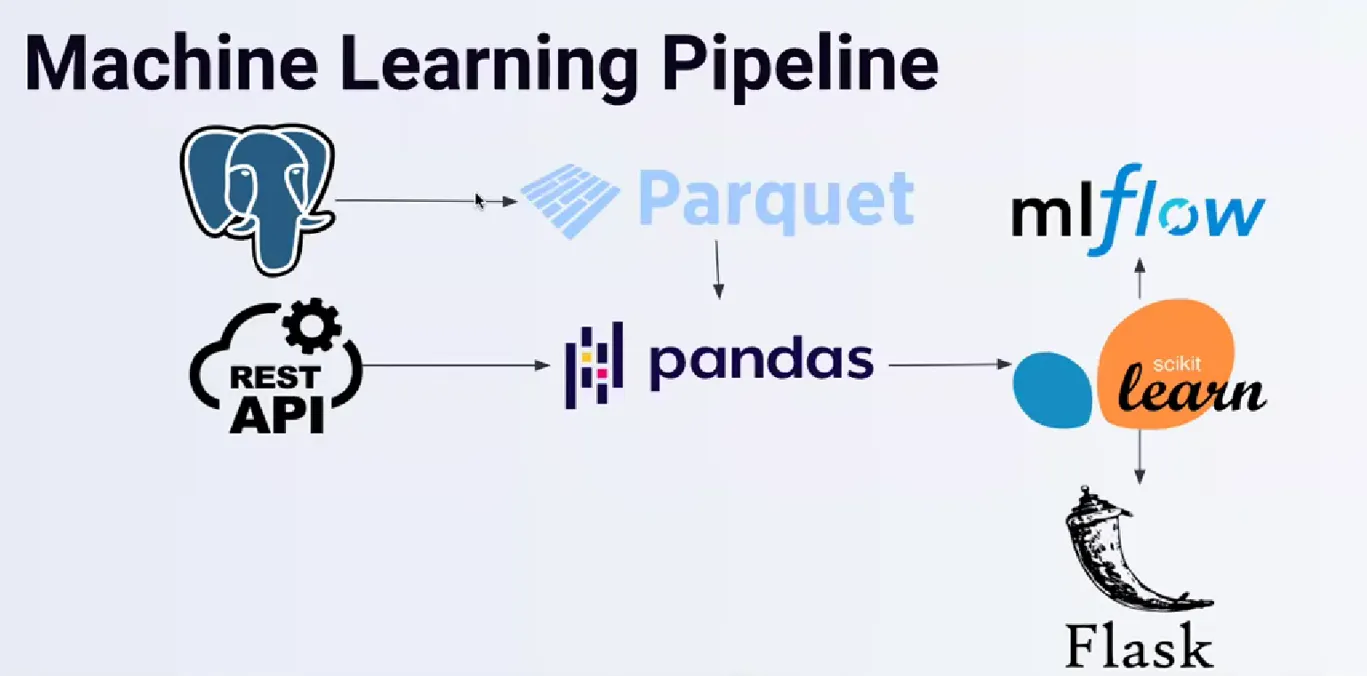
The stages form a dependency graph. A failed data load should prevent training from starting, while a failed evaluation should prevent a deployment decision. Retries are appropriate for transient operations such as reading from a remote store. They are not a substitute for fixing invalid data or a broken model.
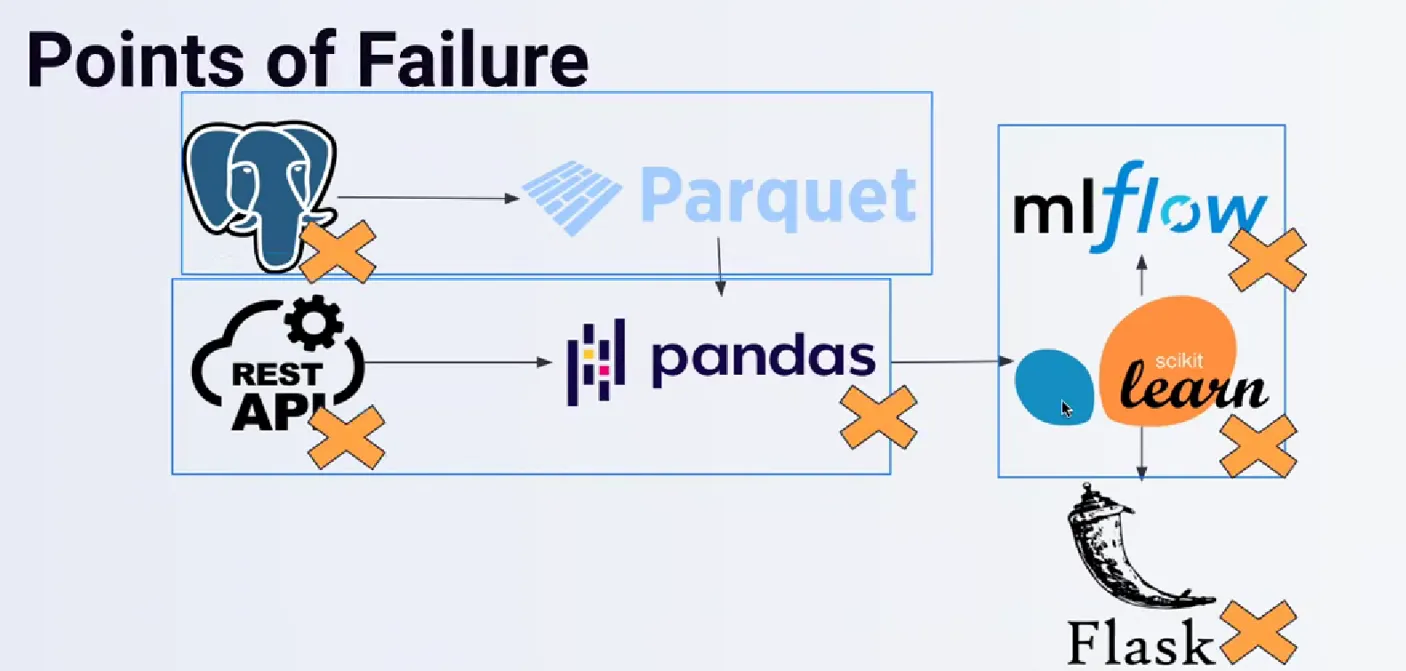
For this example the flow is deliberately small:
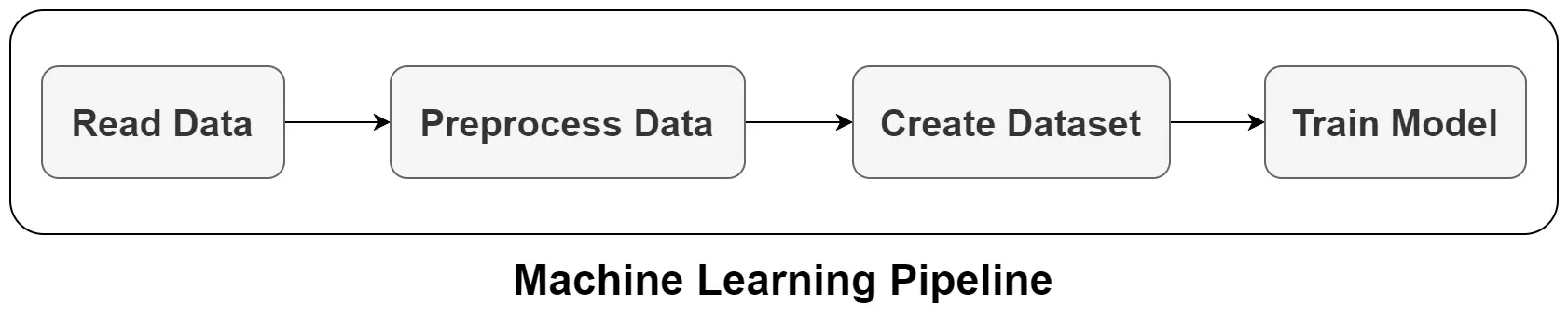
| Step | Input | Output |
|---|---|---|
| Load | CSV path | Rows with review text and labels |
| Split | Rows, test_size, random_state | Training, validation, and test data |
| Train | Training and validation data | Fitted pipeline, validation score, MLflow run ID |
| Evaluate | Fitted pipeline and test data | Held-out test score |
| Register | Run ID and model artifact path | A version or alias in the model registry |
What Prefect provides
Prefect turns ordinary Python functions into observable flows and tasks. A flow is the top-level unit of work. A task is a step inside a flow. Prefect records their states, supports retries, and lets a deployment create runs on a schedule.
The current execution model uses work pools and workers:
| Concept | Role in this example |
|---|---|
| Flow | Defines the complete training run and its parameters |
| Task | Encapsulates loading, splitting, training, or evaluation |
| Deployment | Stores how and when Prefect should create flow runs |
| Work pool | Names the execution environment, such as a Docker pool |
| Worker | Polls the pool and starts eligible flow runs |
A local server is enough to inspect a tutorial run. Install one tested set of packages:
python -m pip install "prefect==3.8.5" "mlflow==3.5.0" "pandas==2.2.3" "scikit-learn==1.5.2"
prefect version
prefect server start
In another terminal, point the Prefect client at the local API:
export PREFECT_API_URL="http://127.0.0.1:4200/api"The server UI is available at http://127.0.0.1:4200. A local file-backed MLflow store keeps this example runnable without provisioning cloud services. Set MLFLOW_TRACKING_URI when using a shared MLflow server.
A complete flow
Save the following as sentiment_flow.py next to Womens Clothing E-Commerce Reviews.csv. The data set must contain Review Text and Recommended IND columns. The flow uses ordinary scikit-learn objects so the example can run on a laptop or inside a worker.
from __future__ import annotations

import os
import re
from typing import Any

import mlflow
import mlflow.sklearn
import pandas as pd
from mlflow.models import infer_signature
from prefect import flow, task
from sklearn.feature_extraction.text import TfidfVectorizer
from sklearn.linear_model import LogisticRegression
from sklearn.metrics import accuracy_score
from sklearn.model_selection import train_test_split
from sklearn.pipeline import Pipeline


def clean_reviews(reviews: pd.Series) -> pd.Series:
    """Apply deterministic text cleanup without fitting on any examples."""
    return reviews.fillna("").astype(str).map(
        lambda review: re.sub(r"[^a-zA-Z]", " ", review).lower()
    )


@task(retries=2, retry_delay_seconds=30, log_prints=True)
def read_data(filename: str) -> pd.DataFrame:
    data = pd.read_csv(filename)
    required = {"Review Text", "Recommended IND"}
    missing = required.difference(data.columns)
    if missing:
        raise ValueError(f"Missing columns: {sorted(missing)}")

    data = data.dropna(subset=["Recommended IND"])
    return data[["Review Text", "Recommended IND"]].reset_index(drop=True)


@task
def split_data(
    data: pd.DataFrame, test_size: float = 0.2, random_state: int = 42
) -> tuple[pd.DataFrame, pd.DataFrame, pd.DataFrame]:
    if not 0 < test_size < 1:
        raise ValueError("test_size must be between 0 and 1")

    train, holdout = train_test_split(
        data,
        test_size=test_size,
        random_state=random_state,
        stratify=data["Recommended IND"],
    )
    validation, test = train_test_split(
        holdout,
        test_size=0.5,
        random_state=random_state,
        stratify=holdout["Recommended IND"],
    )
    return train, validation, test


@task(log_prints=True)
def train_model(
    train: pd.DataFrame,
    validation: pd.DataFrame,
    random_state: int,
    test_size: float,
) -> tuple[Pipeline, str, float]:
    pipeline = Pipeline(
        [
            (
                "vectorizer",
                TfidfVectorizer(
                    token_pattern=r"(?u)\b[a-zA-Z][a-zA-Z]+\b",
                    max_features=3000,
                ),
            ),
            (
                "classifier",
                LogisticRegression(max_iter=1000, random_state=random_state),
            ),
        ]
    )

    train_text = clean_reviews(train["Review Text"])
    validation_text = clean_reviews(validation["Review Text"])
    pipeline.fit(train_text, train["Recommended IND"])
    validation_score = accuracy_score(
        validation["Recommended IND"], pipeline.predict(validation_text)
    )

    tracking_uri = os.getenv("MLFLOW_TRACKING_URI", "file:./mlruns")
    mlflow.set_tracking_uri(tracking_uri)
    mlflow.set_experiment("prefect-sentiment")
    with mlflow.start_run(run_name="prefect-sentiment") as active_run:
        mlflow.log_params(
            {
                "test_size": test_size,
                "random_state": random_state,
                "max_features": 3000,
            }
        )
        mlflow.log_metric("validation_accuracy", validation_score)
        signature = infer_signature(train_text, pipeline.predict(train_text))
        mlflow.sklearn.log_model(
            pipeline,
            artifact_path="model",
            signature=signature,
            input_example=[str(train["Review Text"].iloc[0])],
        )
        run_id = active_run.info.run_id

    return pipeline, run_id, validation_score


@task
def evaluate_model(model: Pipeline, test: pd.DataFrame) -> float:
    test_text = clean_reviews(test["Review Text"])
    return accuracy_score(
        test["Recommended IND"], model.predict(test_text)
    )


@flow(name="sentiment-training", log_prints=True)
def sentiment_training(
    data_path: str = "Womens Clothing E-Commerce Reviews.csv",
    test_size: float = 0.2,
    random_state: int = 42,
) -> dict[str, Any]:
    data = read_data(data_path)
    train, validation, test = split_data(data, test_size, random_state)
    model, run_id, validation_score = train_model(
        train, validation, random_state, test_size
    )
    test_score = evaluate_model(model, test)
    result = {
        "run_id": run_id,
        "validation_accuracy": validation_score,
        "test_accuracy": test_score,
        "artifact_path": "model",
    }
    print(result)
    return result


if __name__ == "__main__":
    sentiment_training()
The split is performed on the raw rows before the vectorizer sees any text. fit runs only on the training reviews. Validation selects settings during development, while the test split is read once for the final reported score. The random_state and test_size arguments are passed through to the split, so changing them changes the recorded experiment rather than being silently ignored.
The MLflow run ID comes from active_run.info.run_id and is returned in the result dictionary. The model artifact contains the fitted vectorizer and classifier together, so the path used for logging is the same path used for loading later.
The flow can be called as an ordinary Python function:
python sentiment_flow.pyWith the local Prefect server running, the flow and its tasks appear in the UI. A failure in read_data retries twice after 30 seconds. A missing column fails immediately with a useful message.
Batch inference and artifacts
The fitted pipeline accepts a batch of strings. Passing a list preserves the batch dimension; transposing the input or passing one character at a time changes the input contract.
import mlflow

model = mlflow.pyfunc.load_model(f"runs:/{result['run_id']}/model")
reviews = [
    "The fabric is comfortable and the fit is accurate.",
    "The item arrived damaged and the sizing was wrong.",
]
predictions = model.predict(reviews)
print(predictions)
The same run can be registered explicitly after the flow completes:
import mlflow
from mlflow.tracking import MlflowClient

model_name = "prefect-sentiment"
run_id = result["run_id"]
model_uri = f"runs:/{run_id}/model"

registered = mlflow.register_model(model_uri=model_uri, name=model_name)
client = MlflowClient()
client.set_registered_model_alias(
    name=model_name,
    alias="champion",
    version=registered.version,
)

champion = mlflow.pyfunc.load_model(f"models:/{model_name}@champion")
downloaded_path = mlflow.artifacts.download_artifacts(
    run_id=run_id,
    artifact_path="model",
)
print(champion, downloaded_path)
The registry version and the champion alias point to the run returned by this execution. An alias is useful when a deployment should follow a deliberate promotion, while a version is useful when a deployment must remain fixed. The download call uses the same model artifact path that the flow logged.
Scheduling with a work pool
A deployment describes how Prefect should create runs. The following small deployment script uses a Docker work pool. Build the image with the dependencies above and set PREFECT_API_URL in the environment where the deployment command runs.
Save this as deploy_flow.py:
from sentiment_flow import sentiment_training

if __name__ == "__main__":
    sentiment_training.deploy(
        name="sentiment-training-daily",
        work_pool_name="sentiment-pool",
        image="registry.example.com/mlops/sentiment:2026-09",
        push=False,
        cron="0 6 * * *",
    )
Create the pool, register the deployment, and start a worker:
prefect work-pool create --type docker sentiment-pool
python deploy_flow.py
prefect worker start --pool sentiment-pool
A run can then be started on demand:
prefect deployment run "sentiment-training/sentiment-training-daily"The worker needs access to the CSV file and to the MLflow tracking and artifact locations. For a remote run, package the flow and its dependencies in the image and give the worker’s runtime identity the required storage and MLflow permissions. Set the image registry and storage locations in the deployment environment.
Prefect also supports a local flow.serve process for a small single-machine schedule. A work pool is the more useful boundary when the flow should run in a separate container or on a managed worker.
Practical boundaries
Retries, scheduling, and run history help answer operational questions: which input ran, which step failed, and which model artifact was produced. They do not replace data validation, an evaluation policy, access control, or a review before promoting a model alias.
The example keeps the final test set separate from training and validation, but its accuracy is still one measurement on this data set. A production workflow should add data-quality checks, a representative evaluation set, and a rollback path before using a scheduled run to change a serving model.
Work with Nazmi
Build your AI system with Nazmi.
Tell us what you are building, what exists today, and where your team needs help.
Start a conversation or book a 20-minute call →