
Data Engineering: Week 3b: Data Warehouse and BigQuery ML
 Isaac Kargar4 min read
The previous article introduced warehouse storage, partitioning, clustering, and ingestion. This post uses the NYC taxi data to train a BigQuery ML model, evaluate it, export it for serving, and compare the surrounding workflow with Amazon Redshift ML.
Machine learning in BigQuery
BigQuery ML lets us train and evaluate some models with SQL where the data already lives. That can shorten an exploratory workflow because the features do not need to be copied into a separate notebook environment. It does not remove the need to define a target, split or validate data appropriately, track experiments, and monitor the resulting model.
The current BigQuery ML model reference groups the supported model types roughly as follows:
| Group | Examples | Typical use |
|---|---|---|
| Regression and classification | LINEAR_REG, LOGISTIC_REG, BOOSTED_TREE_CLASSIFIER, BOOSTED_TREE_REGRESSOR, RANDOM_FOREST_CLASSIFIER, RANDOM_FOREST_REGRESSOR, DNN_CLASSIFIER, DNN_REGRESSOR | Predict numeric or categorical labels |
| Unsupervised and recommendation | KMEANS, PCA, AUTOENCODER, MATRIX_FACTORIZATION | Segmentation, dimensionality reduction, anomaly detection, or recommendations |
| Time series | ARIMA_PLUS, ARIMA_PLUS_XREG | Forecast time-indexed data |
| Automated and imported models | AUTOML_CLASSIFIER, AUTOML_REGRESSOR, imported TensorFlow, TensorFlow Lite, ONNX, XGBoost, and remote models | Use a managed search or bring a model trained elsewhere |
The exact options and availability depend on the model type and the current BigQuery release. The table is a map of categories, not a claim that every option has the same training or serving contract.
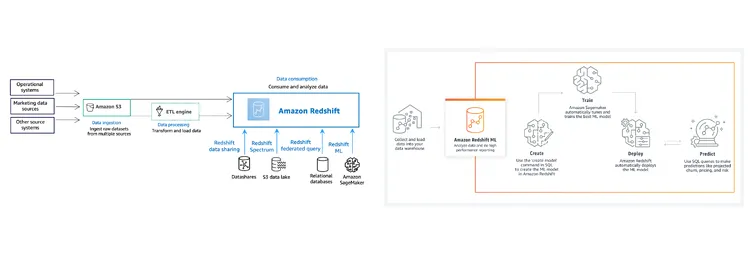
The BigQuery ML overview provides the current feature list and examples.
A linear regression example
The following statements create a typed feature table and a linear regression model. The project and dataset names are examples from the public course data. Replace them with resources to which your account has access.
-- Build a typed feature table.
CREATE OR REPLACE TABLE `taxi-rides-ny.nytaxi.yellow_tripdata_ml` AS
SELECT
  passenger_count,
  trip_distance,
  CAST(PULocationID AS STRING) AS PULocationID,
  CAST(DOLocationID AS STRING) AS DOLocationID,
  CAST(payment_type AS STRING) AS payment_type,
  fare_amount,
  tolls_amount,
  tip_amount
FROM `taxi-rides-ny.nytaxi.yellow_tripdata_partitioned`
WHERE fare_amount != 0;

-- Train with an automatically selected split.
CREATE OR REPLACE MODEL `taxi-rides-ny.nytaxi.tip_model`
OPTIONS (
  MODEL_TYPE = 'LINEAR_REG',
  INPUT_LABEL_COLS = ['tip_amount'],
  DATA_SPLIT_METHOD = 'AUTO_SPLIT'
) AS
SELECT *
FROM `taxi-rides-ny.nytaxi.yellow_tripdata_ml`
WHERE tip_amount IS NOT NULL;

-- Inspect features, evaluation metrics, and predictions.
SELECT *
FROM ML.FEATURE_INFO(MODEL `taxi-rides-ny.nytaxi.tip_model`);

SELECT *
FROM ML.EVALUATE(
  MODEL `taxi-rides-ny.nytaxi.tip_model`,
  (SELECT * FROM `taxi-rides-ny.nytaxi.yellow_tripdata_ml`
   WHERE tip_amount IS NOT NULL)
);

SELECT *
FROM ML.PREDICT(
  MODEL `taxi-rides-ny.nytaxi.tip_model`,
  (SELECT * FROM `taxi-rides-ny.nytaxi.yellow_tripdata_ml`
   WHERE tip_amount IS NOT NULL)
);

SELECT *
FROM ML.EXPLAIN_PREDICT(
  MODEL `taxi-rides-ny.nytaxi.tip_model`,
  (SELECT * FROM `taxi-rides-ny.nytaxi.yellow_tripdata_ml`
   WHERE tip_amount IS NOT NULL),
  STRUCT(3 AS top_k_features)
);
AUTO_SPLIT chooses a split for evaluation. For a production experiment, make the split and its time or group boundary explicit when the data has leakage risks, then keep the test set out of tuning.
BigQuery ML can also run a hyperparameter search. The following is an example configuration rather than a guarantee that five trials are enough for this dataset:
CREATE OR REPLACE MODEL `taxi-rides-ny.nytaxi.tip_hyperparam_model`
OPTIONS (
  MODEL_TYPE = 'LINEAR_REG',
  INPUT_LABEL_COLS = ['tip_amount'],
  DATA_SPLIT_METHOD = 'AUTO_SPLIT',
  NUM_TRIALS = 5,
  MAX_PARALLEL_TRIALS = 2,
  L1_REG = HPARAM_RANGE(0, 20),
  L2_REG = HPARAM_CANDIDATES([0, 0.1, 1, 10])
) AS
SELECT *
FROM `taxi-rides-ny.nytaxi.yellow_tripdata_ml`
WHERE tip_amount IS NOT NULL;
Exporting a model
An exported model can be served by a compatible runtime. The BigQuery ML export guide documents the supported model types and serving formats. The shell sequence exports the model, copies the versioned directory locally, and starts TensorFlow Serving for a local prediction request.
export PROJECT_ID="YOUR_GCP_PROJECT"
export DATASET="nytaxi"
export MODEL_BUCKET="YOUR_MODEL_BUCKET"
export MODEL_NAME="tip_model"

bq --project_id="$PROJECT_ID" extract -m \
  "$PROJECT_ID:$DATASET.$MODEL_NAME" \
  "gs://$MODEL_BUCKET/$MODEL_NAME"

rm -rf serving_dir
mkdir -p serving_dir
gcloud storage cp --recursive \
  "gs://$MODEL_BUCKET/$MODEL_NAME" \
  serving_dir/

docker pull tensorflow/serving
docker run --rm -p 8501:8501 \
  --mount "type=bind,source=$(pwd)/serving_dir/$MODEL_NAME,target=/models/$MODEL_NAME" \
  -e "MODEL_NAME=$MODEL_NAME" \
  tensorflow/serving
In a second terminal, send a request that matches the exported model’s signature:
curl --fail-with-body \
  -H 'Content-Type: application/json' \
  -d '{"instances":[{"passenger_count":1,"trip_distance":12.2,"PULocationID":"193","DOLocationID":"264","payment_type":"2","fare_amount":20.4,"tolls_amount":0.0}]}' \
  'http://localhost:8501/v1/models/tip_model:predict'
The container reads the model from serving_dir/tip_model/<version>. The version directory and the model signature are created by the export; do not hand-edit them. A managed serving product may be a better fit when the model needs authentication, autoscaling, or a release process.
Amazon Redshift
Amazon Redshift is a managed analytical warehouse built from compute nodes. It can load data into Redshift tables, query files in Amazon S3 with Redshift Spectrum, share data between Redshift clusters, and use Redshift ML to train models through SQL.
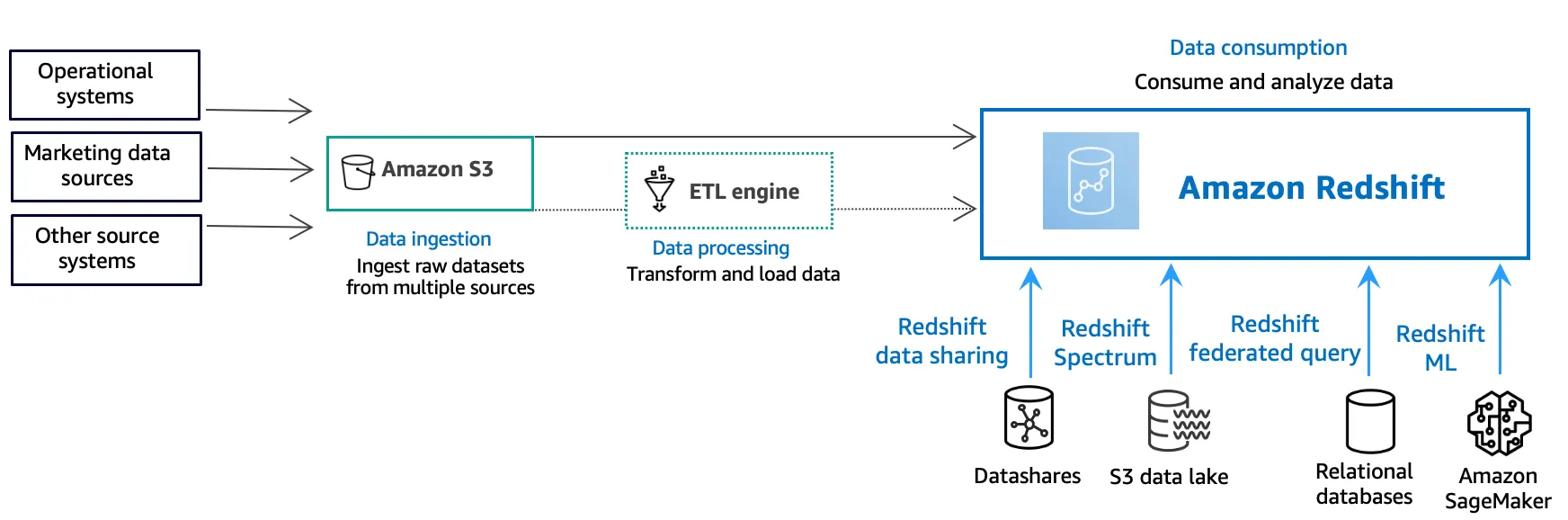
The Redshift concepts diagram shows how storage, processing, and consumption can fit together. Redshift Spectrum reads supported files in S3 through external schemas and tables. Redshift federated queries use FROM or JOIN access to supported relational databases such as Amazon RDS and Aurora, so they are a different path from Spectrum’s object-storage access. See the Spectrum overview and federated query overview.
Redshift ML example
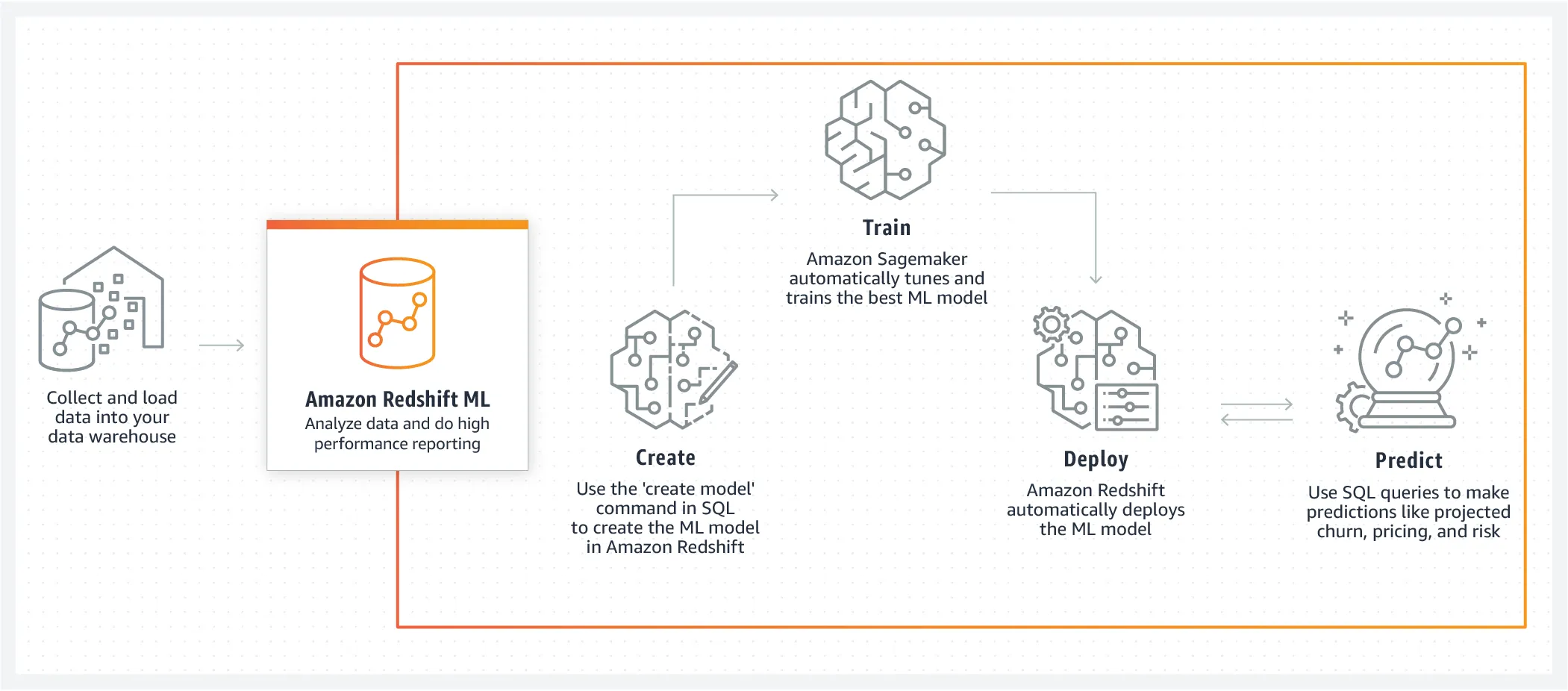
Redshift ML uses Amazon SageMaker capabilities behind a SQL interface. The IAM role and S3 bucket must be created in the AWS account before running the statements. Keep them as environment-specific configuration rather than copying an account identifier into a tutorial.
DROP TABLE IF EXISTS customer_activity;

CREATE TABLE customer_activity (
  state VARCHAR(2),
  account_length INT,
  area_code INT,
  phone VARCHAR(8),
  intl_plan VARCHAR(3),
  vmail_plan VARCHAR(3),
  vmail_message INT,
  day_mins FLOAT,
  day_calls INT,
  day_charge FLOAT,
  total_charge FLOAT,
  eve_mins FLOAT,
  eve_calls INT,
  eve_charge FLOAT,
  night_mins FLOAT,
  night_calls INT,
  night_charge FLOAT,
  intl_mins FLOAT,
  intl_calls INT,
  intl_charge FLOAT,
  cust_serv_calls INT,
  churn VARCHAR(6),
  record_date DATE
);

COPY customer_activity
FROM 's3://redshift-downloads/redshift-ml/customer_activity/'
REGION 'us-east-1'
IAM_ROLE '<REDSHIFT_IAM_ROLE_ARN>'
DELIMITER ','
IGNOREHEADER 1;
CREATE MODEL trains from the selected columns and creates a SQL function for inference. NULLIF keeps the feature calculation defined when a record has an account length of zero:
CREATE MODEL customer_churn_auto_model
FROM (
  SELECT
    state,
    account_length,
    area_code,
    total_charge / NULLIF(account_length, 0) AS average_daily_spend,
    cust_serv_calls / NULLIF(account_length, 0) AS average_daily_cases,
    churn
  FROM customer_activity
  WHERE record_date < '2020-01-01'
)
TARGET churn
FUNCTION ml_fn_customer_churn_auto
IAM_ROLE '<REDSHIFT_IAM_ROLE_ARN>'
SETTINGS (
  S3_BUCKET '<REDSHIFT_ML_BUCKET>'
);

SELECT
  phone,
  ml_fn_customer_churn_auto(
    state,
    account_length,
    area_code,
    total_charge / NULLIF(account_length, 0),
    cust_serv_calls / NULLIF(account_length, 0)
  ) AS predicted_churn
FROM customer_activity
WHERE record_date >= '2020-01-01';
The Redshift ML customer churn tutorial documents the current command and permission requirements.
BigQuery ML and Redshift ML put some model training close to warehouse data, but they differ in supported models, compute, permissions, export paths, and serving integrations. Those operational details should be checked against the current provider documentation before a deployment.
Work with Nazmi
Build your AI system with Nazmi.
Tell us what you are building, what exists today, and where your team needs help.
Start a conversation or book a 20-minute call →