Data Engineering — Week 3b: Data Warehouse and BigQuery ML
Week 3 — Data Engineering Zoomcamp course: Data Warehouse
Note: The content of this post is from the course videos, my understanding and searches, and reference documentation.
Let’s continue with how to do ML in BigQuery.
Machine Learning in BigQuery
It is also possible to do machine learning in BigQuery instead of doing it outside of it. BigQuery ML increases development speed by eliminating the need to move data.
BigQuery ML supports the following types of models: [ ref]
- Linear regression for forecasting; for example, the sales of an item on a given day. Labels are real-valued (they cannot be +/- infinity or NaN).
- Binary logistic regression for classification; for example, determining whether a customer will make a purchase. Labels must only have two possible values.
- Multiclass logistic regression for classification. These models can be used to predict multiple possible values such as whether an input is “low-value,” “medium-value,” or “high-value.” Labels can have up to 50 unique values. In BigQuery ML, multiclass logistic regression training uses a multinomial classifier with a cross-entropy loss function.
- K-means clustering for data segmentation; for example, identifying customer segments. K-means is an unsupervised learning technique, so model training does not require labels nor split data for training or evaluation.
- Matrix Factorization for creating product recommendation systems. You can create product recommendations using historical customer behavior, transactions, and product ratings and then use those recommendations for personalized customer experiences.
- Time series for performing time-series forecasts. You can use this feature to create millions of time series models and use them for forecasting. The model automatically handles anomalies, seasonality, and holidays.
- Boosted Tree for creating XGBoost-based classification and regression models.
- Deep Neural Network (DNN) for creating TensorFlow-based Deep Neural Networks for classification and regression models.
- AutoML Tables to create best-in-class models without feature engineering or model selection. AutoML Tables search through a variety of model architectures to decide the best model.
- TensorFlow model importing. This feature lets you create BigQuery ML models from previously trained TensorFlow models, then perform prediction in BigQuery ML.
- Autoencoder for creating Tensorflow-based BigQuery ML models with the support of sparse data representations. The models can be used in BigQuery ML for tasks such as unsupervised anomaly detection and non-linear dimensionality reduction.
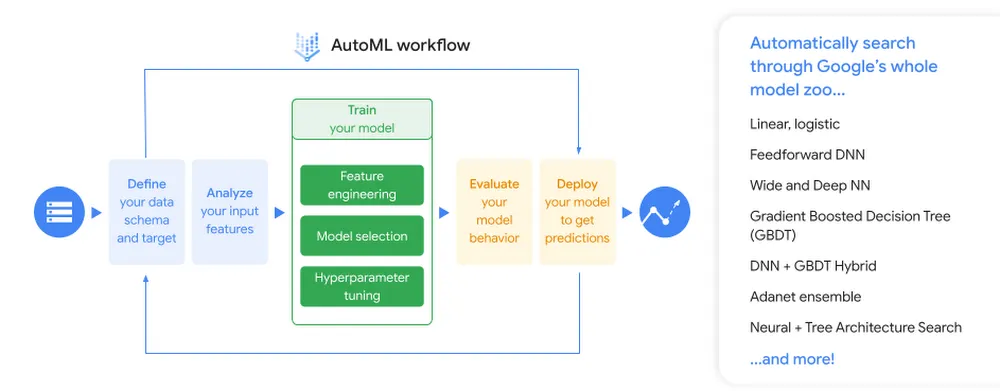
Check here and the following video to learn more about how to train a linear regression model in BQ:
Here is an example of training a liner regression model in BQ on the dataset we uploaded to GCS and BQ in the previous week using Airflow, and also how to do hyperparameter tuning: [ ref1]
-- SELECT THE COLUMNS INTERESTED FOR YOU
SELECT passenger_count, trip_distance, PULocationID, DOLocationID, payment_type, fare_amount, tolls_amount, tip_amount
FROM `taxi-rides-ny.nytaxi.yellow_tripdata_partitoned` WHERE fare_amount != 0;

-- CREATE A ML TABLE WITH APPROPRIATE TYPE
CREATE OR REPLACE TABLE `taxi-rides-ny.nytaxi.yellow_tripdata_ml` (
`passenger_count` INTEGER,
`trip_distance` FLOAT64,
`PULocationID` STRING,
`DOLocationID` STRING,
`payment_type` STRING,
`fare_amount` FLOAT64,
`tolls_amount` FLOAT64,
`tip_amount` FLOAT64
) AS (
SELECT passenger_count, trip_distance, cast(PULocationID AS STRING), CAST(DOLocationID AS STRING),
CAST(payment_type AS STRING), fare_amount, tolls_amount, tip_amount
FROM `taxi-rides-ny.nytaxi.yellow_tripdata_partitoned` WHERE fare_amount != 0
);

-- CREATE MODEL WITH DEFAULT SETTING
CREATE OR REPLACE MODEL `taxi-rides-ny.nytaxi.tip_model`
OPTIONS
(model_type='linear_reg',
input_label_cols=['tip_amount'],
DATA_SPLIT_METHOD='AUTO_SPLIT') AS
SELECT
*
FROM
`taxi-rides-ny.nytaxi.yellow_tripdata_ml`
WHERE
tip_amount IS NOT NULL;

-- CHECK FEATURES
SELECT * FROM ML.FEATURE_INFO(MODEL `taxi-rides-ny.nytaxi.tip_model`);

-- EVALUATE THE MODEL
SELECT
*
FROM
ML.EVALUATE(MODEL `taxi-rides-ny.nytaxi.tip_model`,
(
SELECT
*
FROM
`taxi-rides-ny.nytaxi.yellow_tripdata_ml`
WHERE
tip_amount IS NOT NULL
));

-- PREDICT THE MODEL
SELECT
*
FROM
ML.PREDICT(MODEL `taxi-rides-ny.nytaxi.tip_model`,
(
SELECT
*
FROM
`taxi-rides-ny.nytaxi.yellow_tripdata_ml`
WHERE
tip_amount IS NOT NULL
));

-- PREDICT AND EXPLAIN
SELECT
*
FROM
ML.EXPLAIN_PREDICT(MODEL `taxi-rides-ny.nytaxi.tip_model`,
(
SELECT
*
FROM
`taxi-rides-ny.nytaxi.yellow_tripdata_ml`
WHERE
tip_amount IS NOT NULL
), STRUCT(3 as top_k_features));

-- HYPER PARAM TUNNING
CREATE OR REPLACE MODEL `taxi-rides-ny.nytaxi.tip_hyperparam_model`
OPTIONS
(model_type='linear_reg',
input_label_cols=['tip_amount'],
DATA_SPLIT_METHOD='AUTO_SPLIT',
num_trials=5,
max_parallel_trials=2,
l1_reg=hparam_range(0, 20),
l2_reg=hparam_candidates([0, 0.1, 1, 10])) AS
SELECT
*
FROM
`taxi-rides-ny.nytaxi.yellow_tripdata_ml`
WHERE
tip_amount IS NOT NULL;
After training the model, we need to deploy it. The following video explains how to do that:
And here are the deployment steps: [ ref1, ref2]
- gcloud auth login
- bq --project_id taxi-rides-ny extract -m nytaxi.tip_model gs://taxi_ml_model/tip_model
- mkdir /tmp/model
- gsutil cp -r gs://taxi_ml_model/tip_model /tmp/model
- mkdir -p serving_dir/tip_model/1
- cp -r /tmp/model/tip_model/* serving_dir/tip_model/1
- docker pull tensorflow/serving
- docker run -p 8501:8501 --mount type=bind,source=`pwd`/serving_dir/tip_model,target=
  /models/tip_model -e MODEL_NAME=tip_model -t tensorflow/serving &
- curl -d '{"instances": [{"passenger_count":1, "trip_distance":12.2, "PULocationID":"193", "DOLocationID":"264", "payment_type":"2","fare_amount":20.4,"tolls_amount":0.0}]}' -X POST http://localhost:8501/v1/models/tip_model:predict
- http://localhost:8501/v1/models/tip_model
Here is another nice blog post on using ML in BQ.
You can also check the following video which is a workshop on BQ+Airflow:
Other useful resources:
Amazon Redshift
Amazon Redshift is an alternate AWS data warehouse service that is not covered in the course but is quite comparable to BigQuery. It is an AWS Cloud-based petabyte-scale data warehouse solution that is completely managed. An Amazon Redshift data warehouse is a group of computer resources known as nodes that are arranged into a group known as a cluster. Each cluster contains one or more databases and is powered by an Amazon Redshift engine.
The following diagram illustrates a typical data processing flow in Amazon Redshift. [ ref]
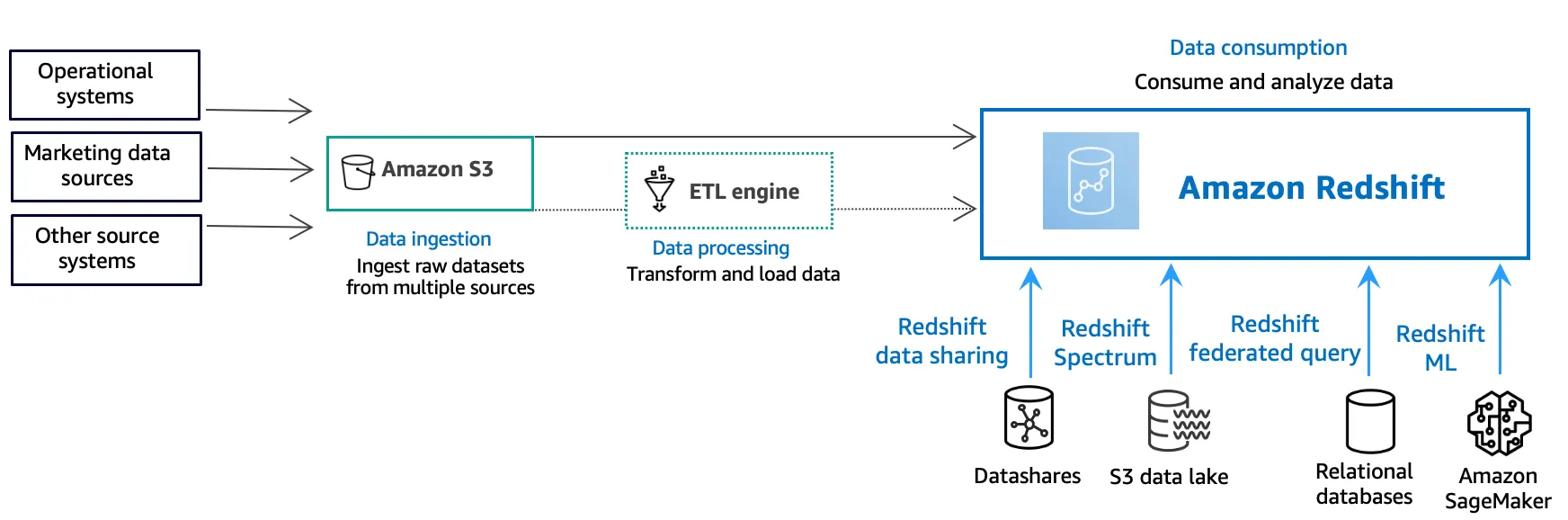
Different types of data sources constantly upload structured, semistructured, or unstructured data to the data storage layer at the data ingestion layer. This data storage area functions as a staging place for data in various states of consumption readiness. An Amazon Simple Storage Service (Amazon S3) bucket is an example of storage.
The source data is preprocessed, validated, and transformed utilizing the extract, transform, load (ETL) or extract, load, transform (ELT) pipelines at the optional data processing layer. ETL techniques are subsequently used to refine these raw datasets. AWS Glue is an example of an ETL engine.
Data is imported into your Amazon Redshift cluster at the data consumption layer, where you can perform analytical applications.
Data can also be consumed for analytical workloads as follows:
- Use datashares to securely and easily transfer live data across Amazon Redshift clusters for reading purposes. Data can be shared at different levels, such as databases, schemas, tables, views, and SQL user-defined functions (UDFs).
- Amazon Redshift Spectrum may be used to query data in Amazon S3 files without having to load the data into Amazon Redshift tables. Amazon Redshift offers SQL capabilities designed for quick and online analytical processing (OLAP) of very big datasets stored in Amazon Redshift clusters and Amazon S3 data lakes.
- Using a federated query, you can join data from relational databases such as Amazon Relational Database Service (Amazon RDS), Amazon Aurora, or Amazon S3 with data from your Amazon Redshift database. Amazon Redshift can be used to query operational data directly (without moving it), apply transformations, and insert data into Amazon Redshift tables.
- Amazon Redshift machine learning (ML) generates models based on the data you provide and the metadata associated with the data inputs. Patterns in the incoming data are captured by these models. These models can be used to make predictions for new input data. Amazon Redshift works with Amazon SageMaker Autopilot to choose the best model and make the prediction function available in Amazon Redshift.
To learn more about Amazon Redshift and how to create databases, tables, and query data from Redshift or external sources check this and this tutorials. It’s almost similar to BigQuery.
Let’s check the more interesting part: Machine Learning in Redshift.
Machine Learning in Redshift
Amazon Redshift ML makes it simple for data analysts and database engineers to construct, train, and deploy machine learning models in Amazon Redshift data warehouses using standard SQL commands. You can use Redshift ML to access Amazon SageMaker, a fully managed machine learning service, without learning new tools or languages. Simply utilize SQL commands to develop and train Amazon SageMaker machine learning models on your Redshift data, and then use these models to predict.
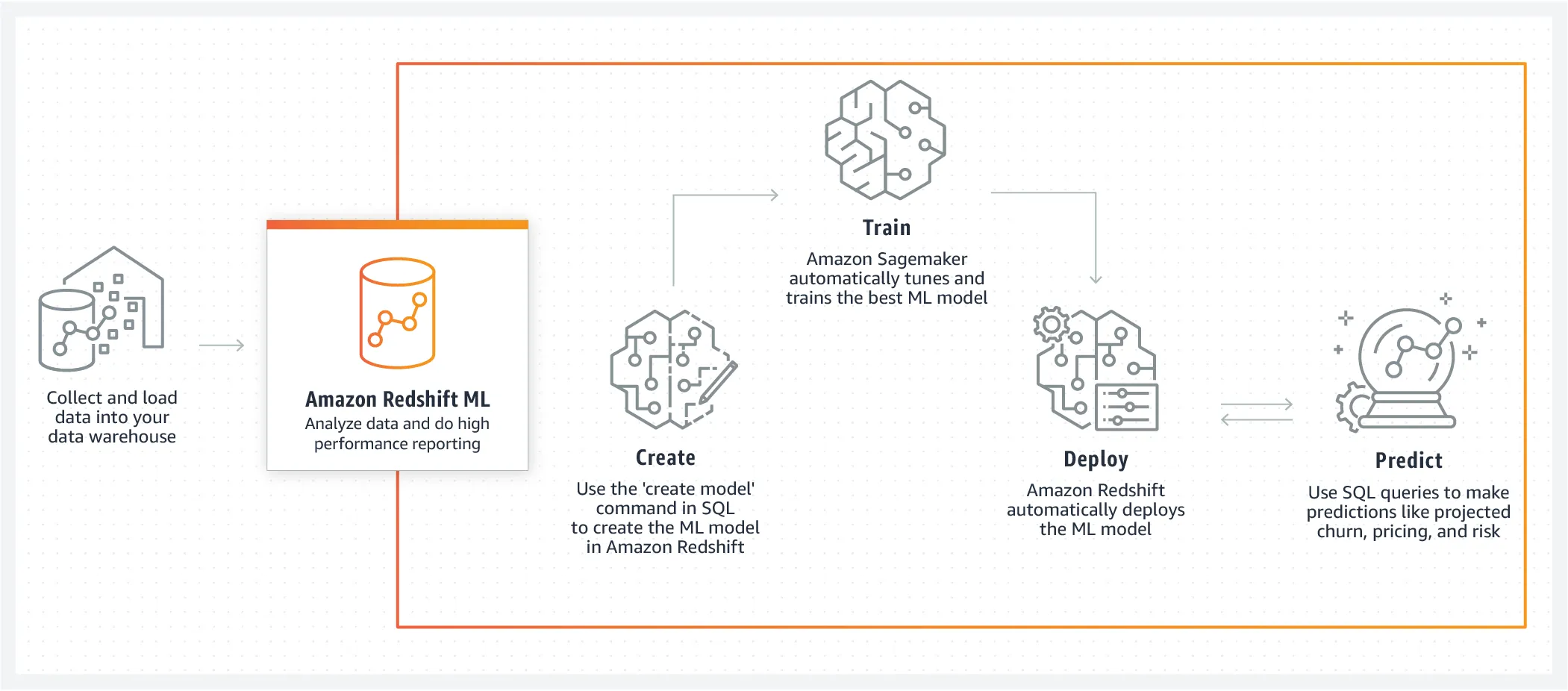
Check the following demo to see how to do machine learning in Amazon Redshift:
Let’s see how to create a model and run some inference queries for different scenarios using the SQL function that the CREATE MODEL command generates. [ ref]
first, create a table from a dataset in S3:
DROP TABLE IF EXISTS customer_activity;

CREATE TABLE customer_activity (
state varchar(2),
account_length int,
area_code int,
phone varchar(8),
intl_plan varchar(3),
vMail_plan varchar(3),
vMail_message int,
day_mins float,
day_calls int,
day_charge float,
total_charge float,
eve_mins float,
eve_calls int,
eve_charge float,
night_mins float,
night_calls int,
night_charge float,
intl_mins float,
intl_calls int,
intl_charge float,
cust_serv_calls int,
churn varchar(6),
record_date date);

COPY customer_activity
FROM 's3://redshift-downloads/redshift-ml/customer_activity/'
REGION 'us-east-1' IAM_ROLE 'arn:aws:iam::XXXXXXXXXXXX:role/Redshift-ML'
DELIMITER ',' IGNOREHEADER 1;
Then creating the model.
CREATE MODEL customer_churn_auto_model FROM (
    SELECT
        state,
        account_length,
        area_code,
        total_charge/account_length AS average_daily_spend,
        cust_serv_calls/account_length AS average_daily_cases,
        churn
    FROM
        customer_activity
    WHERE
        record_date < '2020-01-01'
)
TARGET churn FUNCTION ml_fn_customer_churn_auto
IAM_ROLE 'arn:aws:iam::XXXXXXXXXXXX:role/Redshift-ML'SETTINGS (
  S3_BUCKET 'your-bucket'
);
The SELECT query creates the training data. The TARGET clause specifies which column is the machine learning label that the CREATE MODEL uses to learn how to predict. The remaining columns are the features (input) that are used for the prediction.
And finally, the prediction can be done as follows:
SELECT phone,
       ml_fn_customer_churn_auto(
          state,
          account_length,
          area_code,
          total_charge/account_length ,
          cust_serv_calls/account_length )
          AS active FROM customer_activity WHERE record_date > '2020-01-01';
Conclusion
This week, we focused more on data warehouses and reviewed Google BigQuery and Amazon Redshift services. We learned how to do normal SQL queries and also how to do machine learning in these warehouses using SQL.
Thank you for taking the time to read my post. If you found it helpful or enjoyable, please consider giving it a like and sharing it with your friends. Your support means the world to me and helps me to continue creating valuable content for you.
Work with Nazmi
Have a problem like this to ship?
The two-week AI Opportunity Audit turns it into a prioritized map, a 90-day roadmap, and one build-ready spec — a fixed-fee first step.
See the AI Opportunity Audit or book a 20-minute call →