
Text splitting techniques for LLMs
 Isaac Kargar4 min read
Text splitting turns a document into units that can be indexed, retrieved, and passed to a language model. The right boundary depends on the document structure, the retriever, and the context budget. Smaller chunks can improve targeting but lose context; larger chunks preserve context but can make retrieval less precise.
Level 1: Character splitting
Character splitting cuts text at a fixed character count. It is simple and predictable, but it can break words and sentences.
from langchain_text_splitters import CharacterTextSplitter

splitter = CharacterTextSplitter(
    chunk_size=35,
    chunk_overlap=0,
    separator="",
)

text = "This is an example document that will be split into pieces."
chunks = splitter.split_text(text)
This method is useful as a baseline or for content with no reliable structure. It usually needs a downstream check for broken words and incomplete context.
ChunkViz provides an interactive view of basic splitting behavior. Its display is useful for intuition, not a retrieval-quality evaluation.
Level 2: Recursive character splitting
Recursive splitting tries a list of separators in order. It can keep paragraphs together, then sentences or words when a block is still too large.
from langchain_text_splitters import RecursiveCharacterTextSplitter

splitter = RecursiveCharacterTextSplitter(
    separators=["\n\n", "\n", " ", ""],
    chunk_size=1000,
    chunk_overlap=200,
    length_function=len,
)

text = """
Chapter 1: Introduction

AI is changing how teams work.
A good chunk should keep related sentences together.
"""
chunks = splitter.split_text(text)
The chunk size and overlap are configuration choices. Overlap can preserve context across boundaries, but it also duplicates tokens and increases the index size.
Level 3: Document-specific splitting
Document-specific splitters use structure that a generic character splitter cannot see. Markdown headers, source-code boundaries, PDF layout, tables, and images each carry different signals.
Markdown
The current LangChain splitter is MarkdownHeaderTextSplitter from the langchain_text_splitters package:
from langchain_text_splitters import MarkdownHeaderTextSplitter

markdown_document = """# Foo

## Bar

Hi this is Jim.

Hi this is Joe.

### Boo

Hi this is Lance.

## Baz

Hi this is Molly.
"""

headers_to_split_on = [
    ("#", "Header 1"),
    ("##", "Header 2"),
    ("###", "Header 3"),
]

splitter = MarkdownHeaderTextSplitter(
    headers_to_split_on=headers_to_split_on,
)
documents = splitter.split_text(markdown_document)

for document in documents:
    print(document.metadata, document.page_content)
The splitter carries header names in document metadata so a retrieved passage can retain its section path. Check the current MarkdownHeaderTextSplitter reference for options such as header stripping and line-level output.
Python code
A code splitter can keep common class and function boundaries together while still respecting a maximum size:
from langchain_text_splitters import PythonCodeTextSplitter

python_text = """
class Person:
    def __init__(self, name, age):
        self.name = name
        self.age = age

def describe(person):
    return f"{person.name} is {person.age}"
"""

splitter = PythonCodeTextSplitter(chunk_size=100, chunk_overlap=0)
documents = splitter.create_documents([python_text])
Code boundaries are helpful signals, but a small chunk can still depend on imports or definitions elsewhere. Retrieval tests should include those dependencies.
PDF layout, tables, and images
Unstructured’s PDF partitioner can use its high-resolution strategy when layout, table, or image blocks matter. The image-block arguments below are the current form of the example; older extract_images_in_pdf and image_output_dir_path arguments are obsolete.
from unstructured.partition.pdf import partition_pdf

elements = partition_pdf(
    filename="document.pdf",
    strategy="hi_res",
    infer_table_structure=True,
    extract_image_block_types=["Image", "Table"],
    extract_image_block_to_payload=False,
    extract_image_block_output_dir="static/pdfImages/",
    chunking_strategy="by_title",
    max_characters=4000,
    new_after_n_chars=3800,
    combine_text_under_n_chars=2000,
)
The high-resolution strategy has extra processing cost and dependency requirements. It can preserve table structure and expose image blocks for separate description or indexing, but the output should be inspected for OCR and layout errors. See the Unstructured partitioning documentation for supported options.
Level 4: Semantic splitting
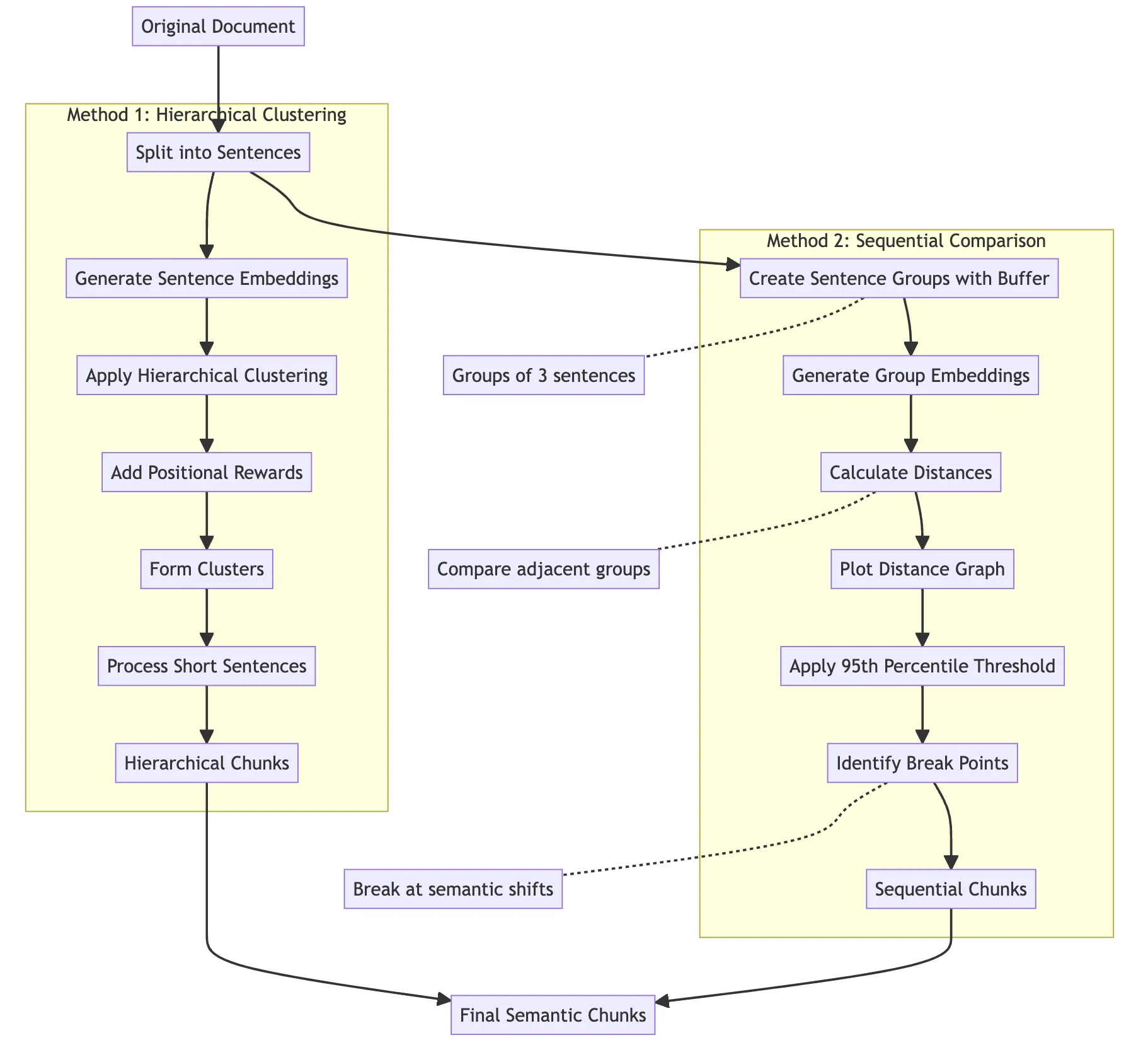
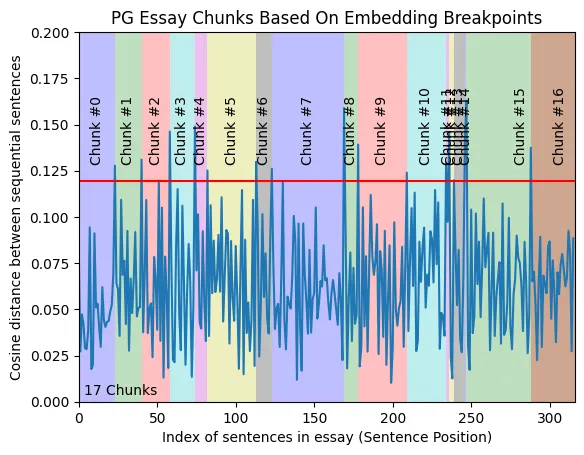
Semantic splitting uses meaning signals in addition to visible document structure. A common workflow embeds sentences, measures distances between neighboring groups, and cuts where the distance indicates a topic change.
The linked five-level text-splitting notebook demonstrates two variants:
- A clustering method combines sentence embeddings with a positional reward. The reward helps retain document order while grouping related sentences.
- A sequential method compares overlapping sentence groups and cuts at large changes in embedding distance. In that notebook, the 95th percentile of the observed distances is an example threshold for that run. It is a notebook setting, not a universal value.
Semantic methods add embedding cost and can split a document in surprising places when the embedding model or threshold is a poor fit. Compare them with structural baselines on the retrieval task you care about.
Level 5: Agentic splitting
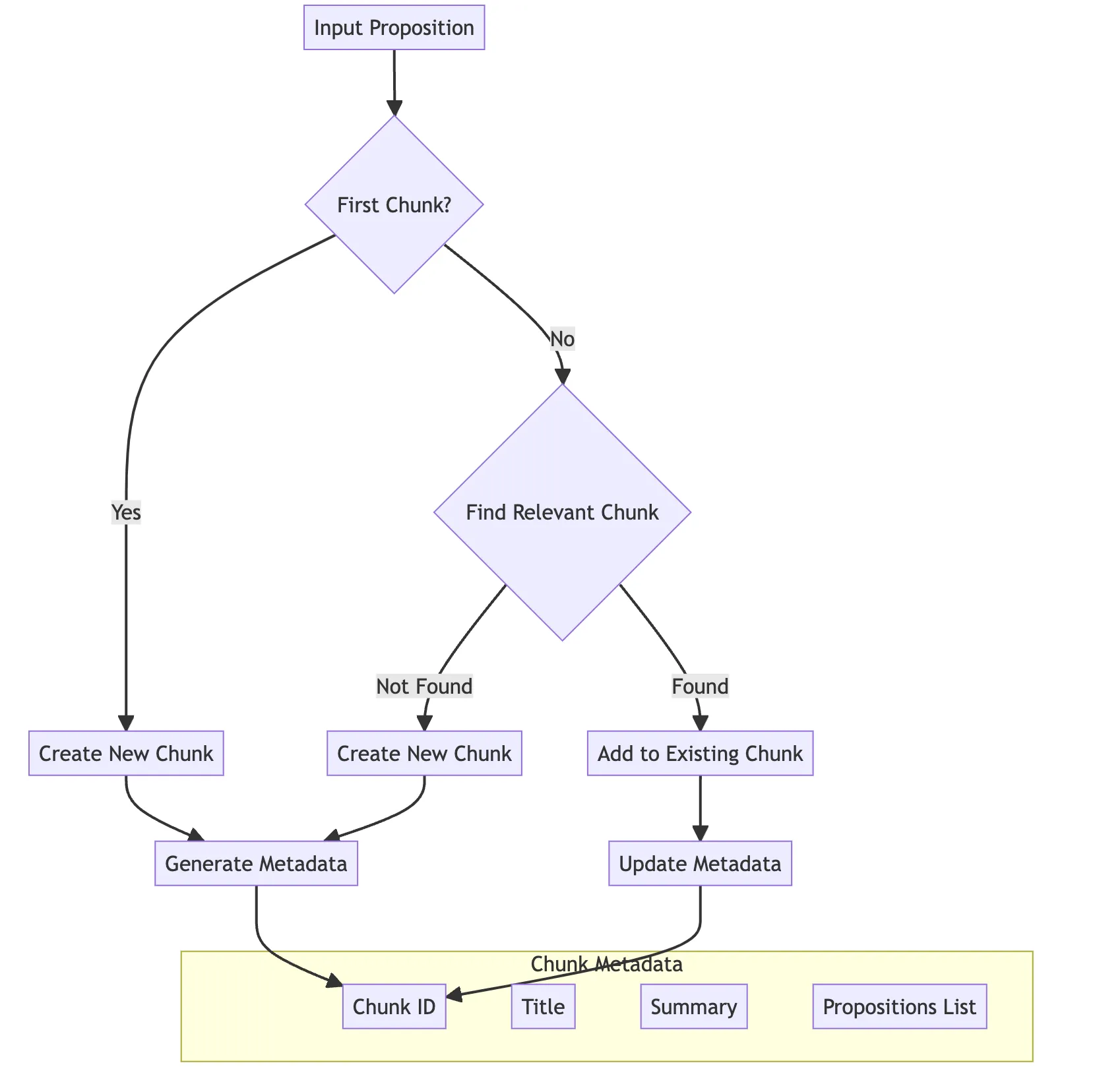
Agentic splitting asks a language model to decide how propositions should be grouped. For example, the sentence “John went to the store, where he bought milk” can be represented as “John went to the store” and “John bought milk.” The proposition split and the grouping decision are illustrative; a model can make different choices.
A grouping agent can maintain metadata such as a chunk identifier, a short title, and a summary as new propositions arrive. That metadata can help a later retriever or reviewer understand why a proposition belongs to a chunk. It also adds model calls, latency, and failure modes. The agent can merge unrelated statements or omit a detail, so the output needs validation.
The linked notebook demonstrates this as an experiment. It does not establish that agentic splitting is more accurate than the structural or semantic methods for every corpus.
Choosing a splitter
Start with the strongest structure available: use headers for Markdown, syntax-aware boundaries for code, and layout-aware extraction for PDFs. Use recursive splitting when the content has useful paragraph boundaries but no reliable document-specific parser. Test semantic or agentic methods when a structural baseline misses relevant passages and the added cost is justified.
Measure retrieval recall and precision with the same corpus, query set, chunk-size settings, overlap, embedding model, and reranking policy. A splitter is useful when it improves the target retrieval or answer task under that evaluation, not because it is the most advanced level.
Work with Nazmi
Build your AI system with Nazmi.
Tell us what you are building, what exists today, and where your team needs help.
Start a conversation or book a 20-minute call →