Graphs to Graph Neural Networks: RDF vs LPG Knowledge Graphs
Graphs to Graph Neural Networks: From Fundamentals to Applications — Part 2c: RDF vs. LPG Knowledge Graphs
Generated by Sonnet 3.5
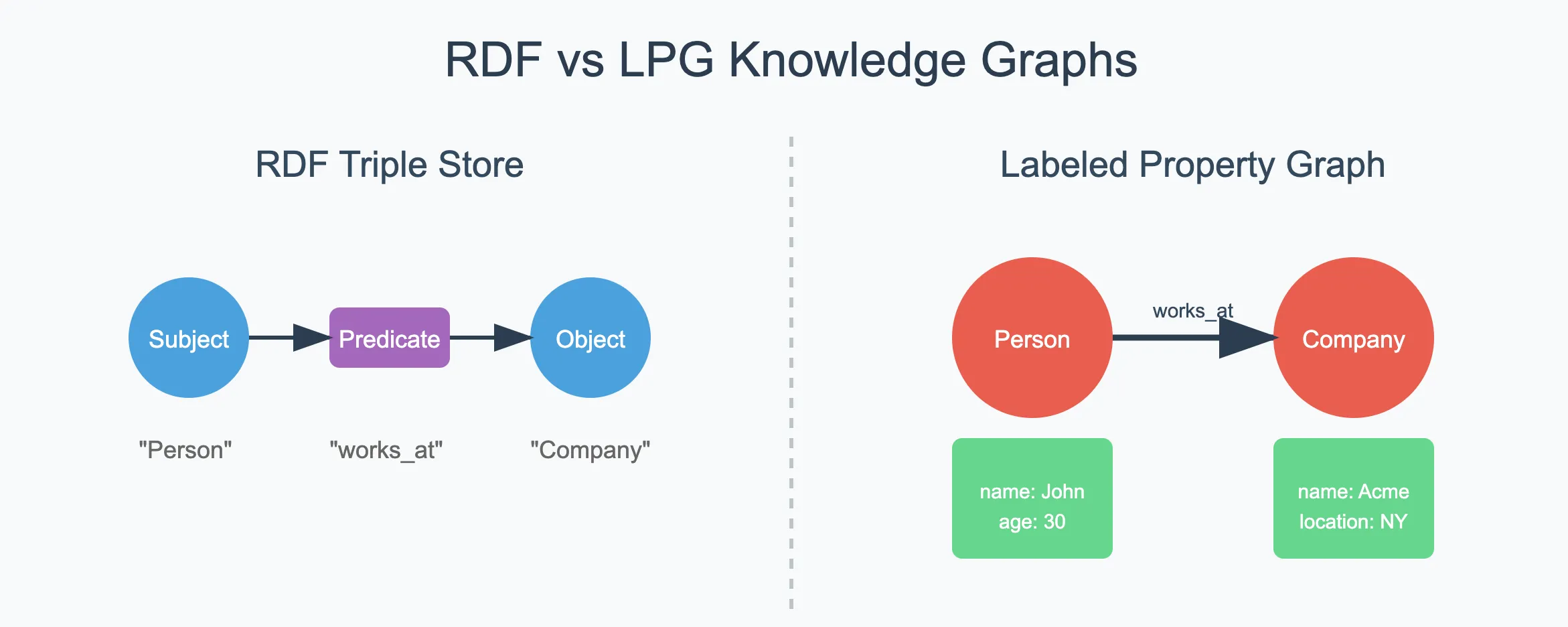
Knowledge graphs are rapidly gaining traction as a way to store and query complex, interlinked data. Two major approaches dominate this space:
- RDF (Resource Description Framework), often coupled with OWL (Web Ontology Language) for reasoning.
- LPG (Labeled Property Graphs), popular in graph databases such as Neo4j.
Both are used in various enterprise and academic settings, each with unique strengths and trade-offs. In this post, we’ll explore what RDF is, how OWL adds richer semantics, and how it contrasts with LPG. Then we’ll examine how RAG (Retrieval-Augmented Generation) with LLMs can be built on top of either model, and how vector search supercharges knowledge retrieval.
Introduction
When people say “knowledge graph,” they often mean some form of graph-based data management that focuses on relationships between entities. A knowledge graph can help answer complex, relationship-heavy questions — like “Who likes pizza?” — with speed and clarity not often matched by traditional relational databases.
But there are two main ways to structure your knowledge graph:
— RDF-Based Graphs:
- Data is stored as triples (subject–predicate–object).
- Uses the SPARQL query language.
- OWL can add logical axioms for automated reasoning.
— Property Graphs (LPG):
- Data is stored as nodes and relationships, each having a set of properties.
- Uses query languages like Cypher, Gremlin, or GSQL.
- Reasoning is not built in, but can be implemented via custom or external tools.
RDF
What Is RDF?
RDF (Resource Description Framework) is a W3C standard for representing data in a graph-like structure. Each data statement is a triple consisting of:
- Subject (the thing being described),
- Predicate (the property or relationship),
- Object (the value or another resource).
Because RDF data is usually used on the web or in large-scale semantic applications, it has standard vocabularies and can be combined with other RDF datasets easily. You query RDF graphs using SPARQL, another W3C standard.
RDF Example
Suppose we want to model a very simple scenario: John is a person who likes Pizza, and Pizza is a type of Food.
@prefix ex: <http://example.org/> .
@prefix rdf: <http://www.w3.org/1999/02/22-rdf-syntax-ns#> .

ex:John  rdf:type    ex:Person ;
         ex:likes    ex:Pizza .
ex:Pizza rdf:type    ex:Food .
Interpreted in plain English:
- “John is a Person”
- “John likes Pizza”
- “Pizza is a Food”
OWL and Reasoning
OWL (Web Ontology Language) builds on RDF to add richer semantics or logical constraints. Instead of merely stating facts, you can define rules: If X and Y are true, then infer Z. An OWL reasoner is special software that reads these axioms and automatically deduces new facts.
Example: The Logical Axiom
Below is an OWL snippet in Turtle syntax that defines classes (Person, Food, FoodLover), an object property (likes), and a special logical axiom:
@prefix ex: <http://example.org/> .
@prefix owl: <http://www.w3.org/2002/07/owl#> .
@prefix rdfs: <http://www.w3.org/2000/01/rdf-schema#> .

###################################################
# Classes
###################################################
ex:Person      a owl:Class .
ex:Food        a owl:Class .
ex:FoodLover   a owl:Class .
###################################################
# Object Properties
###################################################
ex:likes a owl:ObjectProperty .
###################################################
# Logical Axiom
###################################################
# If a Person likes some Food, then that Person is a FoodLover.
[ a owl:Class ;
    owl:intersectionOf (
      [ a owl:Restriction ;
        owl:onProperty ex:likes ;
        owl:someValuesFrom ex:Food
      ]
      ex:Person
    ) ;
    owl:equivalentClass ex:FoodLover
] .- Intersection Restriction: “(A Person) AND (∃ likes.Food)”
- Equivalent Class: This anonymous intersection is equivalent to
FoodLover.
So, any individual who is both a Person and likes some Food is exactly the same set of individuals we call FoodLover. OWL reasoners use this logic to infer new types or relationships.
How Reasoning Works
Given our RDF facts:
ex:John  rdf:type ex:Person ;
         ex:likes ex:Pizza .

ex:Pizza rdf:type ex:Food .
The reasoner sees:
- John is a Person.
- John likes a resource (Pizza) that is classified as Food.
- Our OWL axiom says: “A Person who likes some Food is a FoodLover.”
Therefore, the reasoner infers:
ex:John rdf:type ex:FoodLoverWe never explicitly wrote that triple — the reasoner deduced it. That’s the power of OWL.
Which Files Compose an RDF Graph?
— RDF Data Files
- Often called the “ABox” (assertion box) in semantic web lingo.
- Contains instance data: actual facts like “John likes Pizza,” “Pizza is a Food.”
- Stored in
.ttl,.rdf,.jsonld, etc.
— OWL Ontology Files
- Often called the “TBox” (terminology box).
- Contains class definitions, property definitions, axioms, restrictions, etc.
- Also in
.ttl,.rdf, or another OWL-compatible format.
You can keep them in separate files or merge them. Tools like Protégé, GraphDB, Stardog, and Neptune can load both your ABox and TBox, then run a reasoner to derive extra facts.
Reasoning with LLM vs. Standard Reasoners
- LLM Reasoning: Large language models (like GPT) can interpret or summarize data in a “human-like” way. They’re great for natural language Q&A but not reliable for formal, logically sound inference.
- OWL Reasoners (e.g., HermiT, Pellet, Fact++): Provide sound and complete reasoning for your ontology. They ensure all logical consequences are derived exactly as the axioms specify.
When you say “RDF knowledge graph reasoning,” you typically mean OWL or description logic reasoning. LLM-based reasoning is more about generating text or performing approximate semantic tasks on top of the facts the graph provides.
LPG (Labeled Property Graphs)
Property Graphs store data in a more direct node–relationship structure. Each node and relationship can have multiple properties (key–value pairs). The query languages are often Cypher (Neo4j), Gremlin (JanusGraph/TinkerPop), or GSQL (TigerGraph).
Building the Same Food Example in LPG
If we model the same scenario — John is a Person, John likes Pizza, and Pizza is a Food — our LPG might look like this (using Cypher syntax from Neo4j as an example):
CREATE (john:Person { name: "John" })
CREATE (pizza:Food  { name: "Pizza" })
CREATE (john)-[:LIKES]->(pizza)- We have two nodes:
(john:Person { name: "John" })(pizza:Food { name: "Pizza" })
- We have one relationship:
john→LIKES→pizza
Reasoning in LPG
Unlike RDF/OWL, property graphs do not have a standard mechanism for logical axioms. If you wanted something like “A Person who likes a Food becomes a FoodLover,” you would:
— Add a second label:
MATCH (p:Person)-[:LIKES]->(f:Food)
SET p:FoodLover- Now
Johnhas the labelsPersonandFoodLover.
— Use a property:
MATCH (p:Person)-[:LIKES]->(f:Food)
SET p.isFoodLover = true
— Custom logic:
- You might keep “FoodLover” as an implicit concept, querying
(p:Person)-[:LIKES]->(f:Food)whenever you need all food lovers.
In an LPG database, reasoning is typically implemented via triggers, stored procedures, or external modules. It’s not baked in like OWL reasoners.
RAG Application
RAG (Retrieval-Augmented Generation) uses a data store to retrieve relevant facts before passing them to an LLM to generate a final output. The question is: Which graph model should I use for RAG?
Pros & Cons of RDF vs. LPG for RAG
RDF
— Pros
- Allows you to define formal, ontology-based semantics with OWL, which can infer new facts automatically (e.g., “If Person likes some Food, then they are a FoodLover”).
- Uses standard languages (RDF, SPARQL, OWL) for data and queries, making it easier to interoperate with external semantic data sources or Linked Data.
- Highly suitable if you need strict logical modeling, data validation, and alignment with established ontologies.
— Cons
- Steeper learning curve, since you must understand RDF triples, SPARQL queries, and possibly OWL axioms.
- Performance tuning can be more complex when dealing with large ontologies and reasoning.
- Some modern features like built-in vector search are still emerging in RDF stores (though some vendors now support it).
LPG
— Pros
- Straightforward to model: nodes represent entities, edges represent relationships, and both can hold properties (key-value pairs).
- Typically easier to get started if you think in terms of “node + relationship + properties,” using query languages like Cypher or Gremlin.
- Many property-graph databases offer robust tooling, including graph algorithms and built-in or well-integrated vector indexing.
— Cons
- No native, standardized semantics or ontology inference like RDF/OWL; you must implement “reasoning” with custom code or triggers.
- Generally not aligned with W3C standards, so interoperability with external semantic data or public ontologies is more ad-hoc.
- You can’t rely on a formal reasoner to guarantee completeness of inferred facts.
In most RAG scenarios, the LLM is the one generating text. The graph is there to fetch the most relevant pieces of information. If you need formal inference (e.g., advanced domain modeling, data validation), RDF/OWL stands out. If you just need to query data relationships quickly and store them in a simpler graph form, LPG is very appealing.
How Vector DB and Graph DB Work Together for RAG
A knowledge graph provides structured relationships among entities (e.g., who likes what, how items connect, which concepts are subclasses of others). A vector database (or vector indexing within a graph) adds semantic similarity search by storing embeddings of textual data in a high-dimensional space. Below is a consolidated look at how this synergy works, why you wouldn’t just use a vector store alone, and how it all ties into RAG (Retrieval-Augmented Generation).
1. Nodes, Entities, and Text in the Graph
— In an RDF or Labeled Property Graph (LPG), each node typically represents:
- An entity (e.g., “John,” “Pizza,” “Company X”)
- A document or text snippet (e.g., a paragraph from a knowledge base)
— These nodes can store textual properties — labels, descriptions, articles — that you can transform into numerical embeddings for semantic similarity searches.
2. Creating and Storing Embeddings
- Extract Text: For each node, decide which property (or properties) to embed (e.g., description, summary, content).
- Generate Embeddings: Use a model like BERT, Sentence-BERT, or an OpenAI embedding API to convert that text into a dense vector.
- Store Vectors:
- In a property graph, you might store the embedding as a property on the node (e.g.,
node.embedding = [0.23, -0.14, ...]). - In an RDF store, you might use a plugin or extension that supports vector data.
- Alternatively, keep the embeddings in a companion vector index that references each node’s unique ID.
3. Querying with Semantic Similarity
- User Query Embedding: When the user asks a question, generate an embedding for that query text with the same (or a compatible) model.
- Vector Similarity Search: Perform a nearest-neighbor search (cosine similarity, Euclidean distance, etc.) against the stored node embeddings.
- Retrieve Top-K Matches: You get the nodes that are closest to the query embedding — meaning they’re conceptually relevant even if keywords differ.
4. Augmenting Vector Results with Graph Traversals
- Semantic + Relational: Once you have the top-K similar nodes, you can leverage the graph structure to enrich or filter those results.
— Example: “Find items similar to ‘Italian cheese dishes.’ Then follow the HAS_INGREDIENT edges to confirm which actually contain cheese, or filter by dietary restrictions.”
- This step goes beyond what a standalone vector store can do, because you can chain multiple graph hops to locate related nodes, metadata, or further context.
5. Contextual Cohesion & Disambiguation
- A pure vector DB can tell you: “These items are close in embedding space.”
- A knowledge graph can say: “Pizza #1 is a four-cheese pizza; Pizza #2 is vegan with cashew cheese; they both appear relevant to the question.”
- Storing relationships and types explicitly (e.g., “Pizza is a Food,” “Restaurant X offers Pizza”) provides clarity and disambiguation that help an LLM produce a more accurate answer.
6. Reasoning and Ontologies (If Using RDF/OWL)
- In RDF/OWL, you can add logical axioms — e.g., “A Person who likes some Food is a FoodLover.”
- You could run a reasoner before or after doing the vector query to ensure new facts (inferred “FoodLover” relationships, for instance) are discovered.
- Property graphs can approximate this with custom logic, but it’s not as standardized or automated as OWL reasoning.
7. Why Not Only Use a Vector DB?
- Loss of Graph Relationships: A pure vector store handles semantic similarity but doesn’t model rich connections (e.g., hierarchies, typed edges, constraints).
- No Native Inference: If you rely on OWL or other domain logic, you need a knowledge graph or external reasoner.
- Limited Metadata & Provenance: Vector stores typically don’t preserve robust metadata or lineage in a structured manner.
- Complex Queries: Graph databases excel at multi-hop queries (finding paths, neighbors, or subgraphs), while vector DBs primarily optimize for nearest-neighbor similarity.
8. Putting It All Together in a Graph RAG Pipeline
- Store Entities & Documents in a graph, each node containing or referencing text.
- Generate Embeddings for these text fields and store them in the graph or a linked vector index.
- User Query → Embedding: Transform the user’s query into a vector.
- Vector Similarity Search: Retrieve the most relevant nodes based on semantic closeness.
- (Optional) Graph Traversal: Expand or filter the results using relationships and domain logic (e.g., “Only return items offered within 5 km,” or “Exclude ingredients the user is allergic to”).
- Prompt the LLM: Provide the LLM with the text/facts from the retrieved nodes — plus any additional context gleaned from traversals — so it can generate a grounded, context-aware answer.
By combining vector embeddings for semantic retrieval with the structured relationships of a knowledge graph, you unlock a richer context for your LLM and achieve more accurate, trustworthy responses. This hybrid approach merges the best of both worlds: the fuzzy matching power of vector search and the explicit, logical framework of graph data.
Conclusion
RDF and LPG are both robust ways to implement a knowledge graph. Your choice might boil down to:
- Need for Formal Semantics: If you want automated reasoning, classification, or alignment with external ontologies, RDF/OWL is often the best approach.
- Simplicity & Graph Analytics: If you prefer an easier-to-understand graph model, advanced property queries, or built-in graph algorithms, LPG solutions (Neo4j, JanusGraph) might be more convenient.
Regardless of which model you pick, RAG workflows benefit greatly from vector-based retrieval — ensuring your large language model has access to the right slices of knowledge. With a properly engineered pipeline, you can make LLMs far more powerful and accurate, whether your graph is RDF or LPG.
Work with Nazmi
Have a problem like this to ship?
The two-week AI Opportunity Audit turns it into a prioritized map, a 90-day roadmap, and one build-ready spec — a fixed-fee first step.
See the AI Opportunity Audit or book a 20-minute call →